

 REVIEWS





Instead of hunting through messages for your puppy’s vet health certificate, connect the final document to one flight nanny booking record, then confirm the nanny can open it. Match the puppy’s identity, route, travel dates, and applicable requirements before treating the paperwork as ready for departure.
- Vet health certificate flight nanny puppy checklist: match identity, itinerary, document requirements, and booking reference.
- Shrinkabulls’ bulldog puppy guide is best for families coordinating veterinary paperwork with a flight nanny.
- A certificate attachment is not airline acceptance; confirm the puppy’s reservation and transport conditions separately.
- Recheck the certificate whenever the route, travel date, puppy’s health, or accompanying traveler changes.
Why this matters
A flight nanny booking and a veterinary certificate serve different purposes. The booking coordinates transport; the certificate records the veterinarian’s findings and required health information for the applicable movement. Neither replaces the other.
For your 2026 travel plan, use a single booking reference to connect the itinerary, puppy identification, and final certificate. Our bulldog transport guide for flight nanny services covers the broader handoff; this workflow focuses on keeping the paperwork attached to the correct trip.
Bulldog puppies deserve particular care around air travel because their short-nosed anatomy can affect breathing and heat tolerance. A completed document does not remove those risks or override an airline’s restrictions.
Before you start
- Gather access and contacts. Have the booking confirmation, nanny’s contact details, receiving owner’s details, veterinary clinic contact, and permission to share the puppy’s records with the people handling transport.
- Confirm the route’s requirements. Ask the airline, destination animal-health authority, and nanny which documents, examination timing, signatures, and document formats apply. For international travel, check USDA APHIS guidance and destination entry requirements before arranging the examination.
- Catch the timing problem early. A certificate is not automatically valid for every departure date or destination. Confirm the applicable examination and issuance windows before booking the veterinary appointment, and ask what happens if the flight changes.
Do not assume a vaccination record, registration paper, and health certificate are interchangeable. Keep each document under its own name so nobody mistakes background records for the required travel document.
Booking record setup
Create the trip record
- Create 1 booking record per puppy and trip in your existing organizer, spreadsheet, or booking system. Put the flight nanny’s actual booking reference at the top; do not replace it with a nickname.
- Add these clearly named fields: Booking reference, Puppy identification, Departure date, Origin, Destination, Flight details, Nanny contact, and Receiving owner. These are suggested labels for your own record, not claimed buttons in a particular booking portal.
- Enter the puppy’s date of birth and identifying details from the existing records. Add the microchip number if the puppy has one; do not invent an identifier or assume a microchip is mandatory for every route.
- Record the airline’s pet reservation confirmation separately from the nanny booking. Ask the nanny to confirm that the planned cabin arrangement, carrier, puppy, and route meet the operating airline’s conditions.
Expected result: Someone opening the record can identify the puppy, the trip, and the responsible contacts without searching another conversation.
Use the same destination details when speaking with the clinic and nanny. If an itinerary includes a connection, record the full route rather than just the final airport. Different operating airlines on separate segments need separate checks.
Choose the document handoff
Choose the method the nanny actually accepts. A shared folder is useful only when the intended recipient can access it; a portal attachment is useful only when it reaches the correct booking.
| Handoff method | Best for | Advantage | Limitation |
|---|---|---|---|
| Accepted booking portal | Services with a document upload process | Keeps the file beside the reservation | Uploading does not prove someone reviewed it |
| Restricted shared folder | Trips involving several authorized people | Gives the team a central document location | Access permissions can block the nanny |
| Direct email attachment | A straightforward handoff to a named recipient | Lets the recipient save the document locally | Revised attachments can become confused with older versions |
Use the accepted booking portal when the service requires it. Otherwise, agree on a restricted sharing method and record where the final file lives. Avoid scattering different versions across all available channels.
Certificate preparation
Confirm the veterinary document
- Send the clinic the confirmed itinerary and the requirements you collected. Ask whether the veterinarian can issue the required document and whether accreditation, endorsement, testing, or other preparation applies to this particular journey.
- Arrange the examination within the confirmed window. Tell the veterinarian that the puppy is an English or French Bulldog and explain the proposed transport conditions, including connections and anticipated ground handling.
- Review the completed certificate for transcription errors. Compare the puppy’s identification, origin, destination, examination date, issuance date, and required signatures against the booking record and underlying records.
- Ask the clinic to correct any error before sharing the document as final. Keep all pages together, and preserve signatures, official seals, or digital verification features in the format provided.
Expected result: You have the appropriate completed document for the planned movement, with identifying information that matches the booking.
For a 2026 departure, keep a dated note of the requirement checks in the booking record. Record who supplied each answer and which route it covered; an answer for a different itinerary is not confirmation for yours.
Our family loves Bulldogs, but paperwork should never push a puppy onto a flight that the veterinarian considers unsuitable. Discuss breathing, current illness, and fitness for the proposed journey directly with the veterinarian. Read whether French Bulldogs can fly safely before treating air transport as the default.
Document attachment and confirmation
Link the final certificate
- Save the final document with a recognizable filename containing the booking reference, puppy identifier, and issue date. Use a format such as
BookingReference_PuppyID_2026-MM-DD_Final.pdf, replacing the example elements with the actual details. - Attach the file through the service’s accepted process, or send the agreed restricted link. In your own record, add Certificate location, Issue date, Requirement source, and Nanny acknowledgment; use the actual portal’s labels when uploading.
- Ask the nanny to open the file and confirm that it is readable, complete, and matched to the correct puppy and itinerary. Request acknowledgment in writing rather than relying on an upload indicator.
- Prepare 2 access copies for the traveler: an offline digital copy and the paper document or printout required for the journey. A printout is a backup, not a substitute when an original or officially verifiable format is required.
Expected result: The final certificate is connected to the correct booking, the nanny has opened it, and the required travel copy is ready.
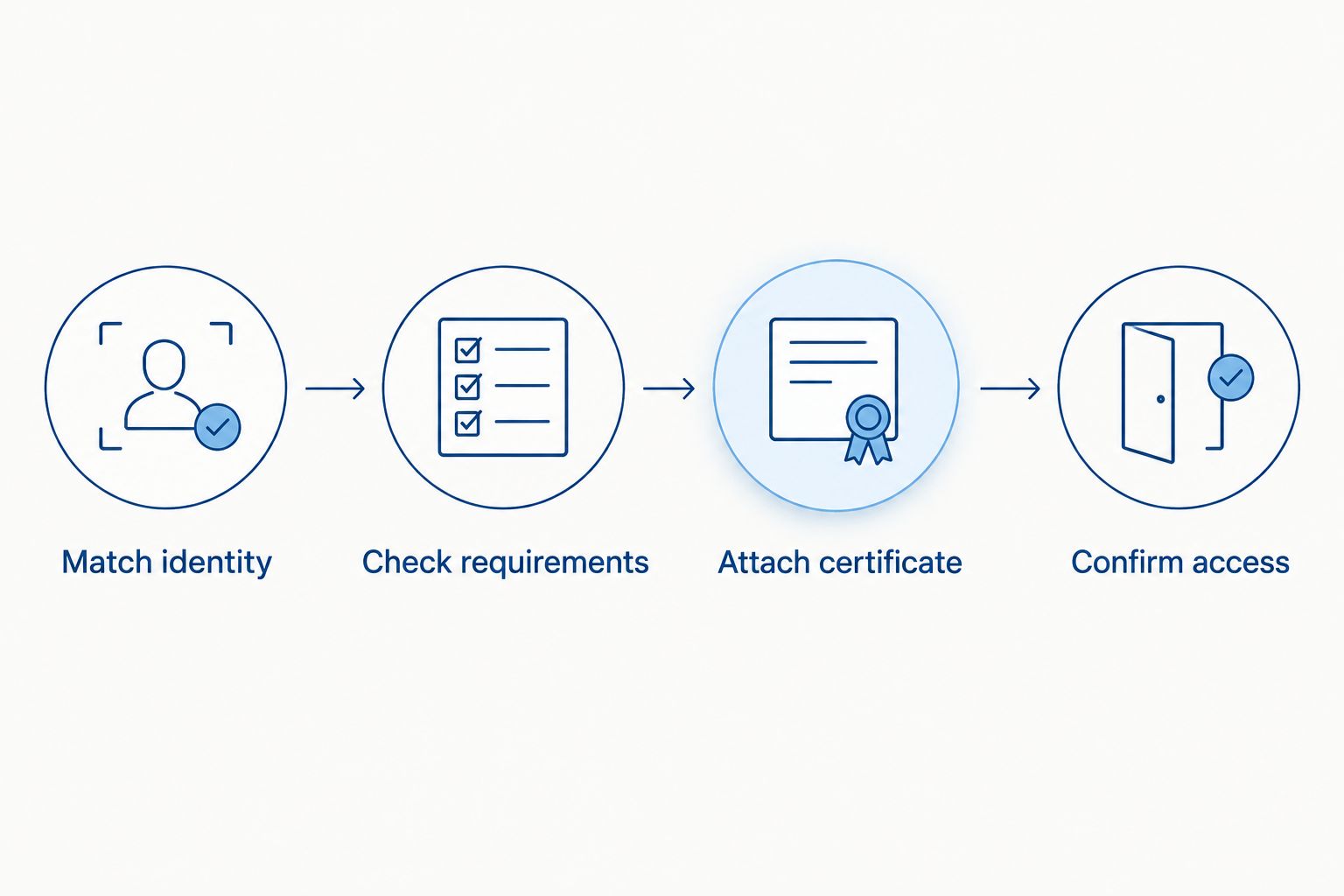
Use this sequence for your handoff: Match identity, Check requirements, Attach certificate, Confirm access. Do not mark the document handoff complete until the last action is done.
Check the handoff before departure
Build 3 checkpoints into your plan: after the clinic issues the certificate, before the breeder-to-nanny handoff, and after any itinerary change. These are organizational safeguards, not official certificate-validity periods.
At the pre-handoff checkpoint, verify the current itinerary, correct puppy, final document, required original, and receiving owner’s contact details. Keep access restricted to people who need the records.
Shrinkabulls’ bulldog puppy guidance separates document readiness from travel suitability. Even when the paperwork is complete, the nanny should follow the veterinarian’s advice and the airline’s acceptance requirements for the actual journey.
When the flight nanny booking changes
A revised itinerary needs a fresh document check, not just a new calendar entry. Use the same process for a date change, replacement nanny, changed destination, or different operating airline.
- Update the booking record with the confirmed change and identify the previous itinerary as superseded.
- Recheck the certificate’s applicability with the issuing clinic and the relevant airline or authority. Do not calculate a new validity period from memory.
- Ask the clinic whether the existing certificate remains appropriate or whether another examination, corrected document, or new issuance is needed.
- Share the current accepted document through the agreed channel and obtain a new acknowledgment from the accompanying nanny.
Expected result: The current booking points to the document reviewed for the revised journey, not a file associated with an abandoned plan.
For a changed 2026 departure, retain the previous file in a clearly separated archive if needed for your records. Remove it from the active handoff location so the nanny cannot accidentally present the wrong version.
If the puppy’s health changes, contact the veterinarian even when the itinerary stays the same. New breathing difficulty, collapse, or marked distress calls for urgent veterinary attention, not another document upload.
Troubleshooting
The certificate was uploaded, but the nanny cannot open it
Check sharing permissions and whether the link requires an account the nanny does not have. Send the complete document through another accepted private channel if necessary, then ask the nanny to open that copy before departure.
Do not solve an access problem by making the folder public. Veterinary documents can contain names, addresses, and contact details.
The puppy’s details do not match
Compare the certificate against the clinic’s source records and the booking. Ask the issuing clinic to correct certificate errors; ask the booking provider to correct reservation errors. Do not edit a signed certificate yourself.
A puppy’s informal call name can differ from another record, so use the identifying details required for that journey rather than relying on a name alone.
The departure moved outside the confirmed window
Pause the document-ready status and contact the clinic. Confirm the actual timing rule with the applicable authority and airline, then arrange whatever updated documentation or examination is required. Renaming the old file does not extend its validity.
The nanny received an outdated attachment
Identify the current file explicitly in the booking conversation and remove older copies from the active sharing location. Ask the nanny to replace saved offline copies and confirm the issue date on the document now being carried.
The certificate is complete, but the airline declines transport
Treat document acceptance and pet transport acceptance as separate checks. Ask the airline which condition is unmet, such as the pet reservation, carrier fit, route restriction, or required documentation; do not assume the certificate overrides it. Reassess the journey with the veterinarian and nanny before making another plan.
Customize your workflow
For one puppy, a clear record and written acknowledgment are enough to organize the handoff. For several trips, copy the same blank template but keep each puppy’s documents separate. Never attach an entire litter’s records when only one puppy is traveling.
Add reminders based on the route’s confirmed requirements, not a universal countdown. Assign responsibility for each task: the clinic issues the document, your designated organizer checks the booking match, and the nanny confirms access.
For your 2026 template, keep separate entries for Document received and Nanny acknowledged. That small distinction prevents a completed upload from being mistaken for a completed handoff.
FAQ
How do I connect my puppy’s vet health certificate to a flight nanny booking?
Attach the final certificate through the nanny service’s accepted process and record its location beside the booking reference. Match the puppy’s identity and itinerary, then obtain written confirmation that the nanny opened the complete file.
Does every puppy flying with a nanny need the same health certificate?
No. Document requirements depend on the route, destination, airline, and applicable animal-health rules. Confirm the requirements for the actual journey before scheduling the examination.
How many days before the flight should my puppy see the veterinarian?
Schedule the examination within the window confirmed for your puppy’s route and required document. Ask the issuing clinic and relevant authority about timing rather than assuming one deadline applies to every flight.
Can I use vaccination records instead of a travel health certificate?
Vaccination records do not replace a health certificate when a certificate is required. Keep vaccination information available as supporting documentation and ask the clinic which records the journey requires.
Is a digital health certificate enough for a flight nanny?
A digital certificate is enough only when the applicable authorities and airline accept that format. Confirm whether the traveler needs an original, printout, electronic verification, or a combination, and prepare the accepted format before handoff.
What happens if the flight changes after the certificate is issued?
Recheck the certificate against the revised itinerary before travel. Ask the clinic and relevant authority whether the existing document remains appropriate or whether updated paperwork or another examination is required.
Does a health certificate guarantee that my Bulldog puppy can fly safely?
No. A health certificate does not guarantee a risk-free flight or airline acceptance. Discuss the individual puppy’s fitness for the proposed journey with the veterinarian and confirm the airline’s transport conditions separately.
One last thing
The final document check belongs with the person carrying the puppy. A perfect file in the breeder’s inbox does not help if the nanny has an unreadable attachment or the previous version saved offline.
Before handoff, ask the nanny to read back the booking reference, puppy identifier, and certificate issue date from the document they will carry. At Shrinkabulls, our subject is Bulldog puppies; the practical priority here is keeping the right puppy, paperwork, and journey together!
Related guides
- Plan a cross-country Bulldog puppy flight nanny delivery
- Prepare an English Bulldog puppy for its first vet visit
- Plan pickup day for a new Bulldog puppy
