

 REVIEWS






Instead of tracing the same ancestors by hand for every proposed litter, connect verified pedigree records to a pedigree-based coefficient of inbreeding (COI) calculation, then save the result with its generation depth and source documents. This workflow helps you compare Bulldog pairings without mistaking missing ancestry—or a low percentage—for proof of good health.
- Shrinkabulls’ guide is best for Bulldog owners organizing pedigree records before a breeding consultation.
- For a pedigree inbreeding coefficient bulldog check, verify ancestor identities before calculating a proposed litter’s COI.
- Compare pedigree COI results only when generation depth, ancestry coverage, and calculation method match.
- Use DNA health testing and veterinary assessment alongside COI, never as interchangeable measures.
Why this matters
A pedigree COI estimates the probability that a dog inherits two copies of an ancestral allele that are identical by descent. It describes ancestry, not the percentage chance that a puppy will develop a particular disease.
For a proposed litter, you need the relationship between the intended sire and dam. Averaging the parents’ individual COIs does not calculate their puppies’ expected COI: two parents with low individual values can still share close ancestors.
Start by reading your Bulldog’s pedigree chart before entering records. A beautifully formatted chart still needs identity checks!
Shrinkabulls’ Bulldog pedigree guide is best for owners organizing ancestry records before a breeding consultation. It helps you prepare the evidence; it does not replace a reproductive veterinarian’s assessment.
Before you start
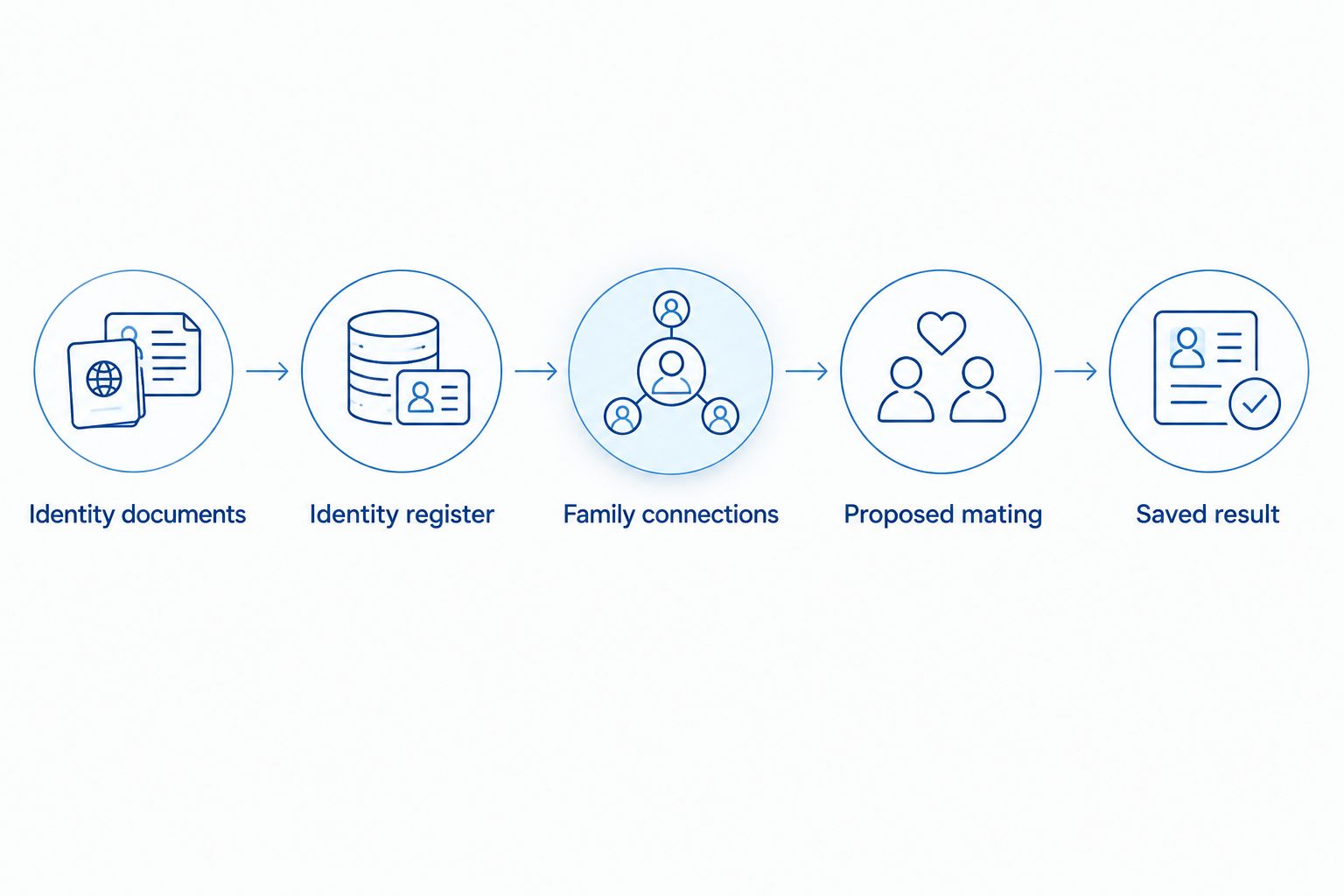
- Gather identity documents. Collect the intended parents’ registered names, registration identifiers, pedigree documents, and supporting records for ancestors. Keep English Bulldog and French Bulldog records clearly distinguished.
- Choose a pedigree-capable calculator. You need access to a system that calculates a proposed mating’s pedigree COI, plus its instructions for ancestor entry or import. A DNA report alone does not supply this workflow.
- Resolve the hidden gotcha: duplicate dogs. A registered name, household nickname, and imported spelling can describe the same ancestor. Splitting that dog into separate records can hide shared ancestry and distort the result.
Keep original documents unchanged. Put corrections and uncertain matches in a separate working record so you can explain every edit later.
The bold field names below are labels to create in your own worksheet, not buttons from a particular calculator. Follow your chosen calculator’s documentation for its actual controls and accepted file format.
Configuration unit: verified ancestor records
Build the identity register
- Create a worksheet with columns labeled Dog ID, Registered name, Registry, Registration number, Sire ID, Dam ID, Source, and Verification status. Use one row per individual dog, not one row per appearance in a chart.
- Give each dog a stable internal Dog ID. Preserve the original registration number exactly, including any prefixes or letters; place your internal identifier in a separate column.
- Enter the intended sire and dam first. Add their parents, then continue backward through the documented ancestry without filling gaps from memory.
- Record a document reference in Source for each parent-child connection. Use Verification status to distinguish confirmed records from unresolved entries.
- Search for repeated registration identifiers and similar names. Merge records only after the supporting evidence establishes that they describe the same dog.
A shared kennel name is not proof that two entries are the same animal. Conversely, a spelling difference is not proof that they are different animals. Registration identifiers and supporting documents take priority over name similarity.
If you receive a replacement pedigree in 2026, retain both versions and identify which one supports the current calculation. Otherwise, an apparently unexplained COI change can become impossible to trace.
Expected result: every documented ancestor has a single identity, and every known parent connects to that identity consistently.
Check the family connections
Read the working pedigree forward and backward. Confirm that each sire and dam belongs to the intended dog, and check available birth information for impossible parent-child ordering.
Leave genuinely unknown parents unknown. Do not invent a shared “Unknown sire” dog and connect unrelated gaps to it; that would introduce a fictional common ancestor. Use the calculator’s documented missing-parent convention instead.
Keep a short unresolved-records list beside the worksheet. A missing grandparent matters differently from an unidentified ancestor at the edge of a much deeper pedigree, but neither should disappear from the report.
Configuration unit: proposed-mating calculation
Connect the parents to the calculator
- Check the calculator’s required pedigree structure. Map Dog ID, Sire ID, and Dam ID to its documented identity and parent fields; map other columns only where supported.
- Enter or import the records using the calculator’s instructions. If importing, inspect its validation messages before proceeding. Correct rejected identifiers and broken parent references in the working file.
- Open the reconstructed pedigree and inspect both parental branches. Confirm that repeated ancestors resolve to the same individual and that the intended sire and dam have not been exchanged with similarly named dogs.
- Set the calculation depth, where the calculator allows it. Record whether the result uses a specified number of generations or all available ancestry.
- Calculate the proposed mating’s offspring COI. Save the result together with the calculator name, calculation method, pedigree depth, missing ancestry, and run date.
Expected result: the report identifies the intended parental pair and calculates their hypothetical offspring’s pedigree COI—not merely either parent’s own COI.
Use the same depth when comparing candidates. A 5-generation result and a 10-generation result answer different ancestry questions; the deeper calculation has an opportunity to detect relationships outside the shorter chart.
Keep the calculation attached to its evidence
Your saved result needs more than a percentage. Create a report record with Pair ID, Sire ID, Dam ID, COI result, Generation depth, Missing ancestry, Calculator, and Run date.
For your 2026 breeding records, add a Record version field. This separates a new mating comparison from a rerun caused by corrected ancestry.
A PDF or screenshot preserves what the calculator displayed, but also retain the input file where possible. The input explains the result; a screenshot alone cannot show whether an ancestor was entered twice or omitted.
Configuration unit: interpretation and review
Check what the percentage actually means
- Confirm that the report labels the output as offspring inbreeding, rather than parental relatedness or another relationship statistic. Relatedness coefficients and offspring COI are not interchangeable labels.
- Read the ancestry coverage beside the value. A pedigree COI of 0% means no shared ancestry was detected under that calculation’s records and assumptions; it does not prove that the dogs share no ancestors.
- Compare candidate pairings using the same calculator, depth, and record-quality rules. Flag incomplete branches rather than treating the smallest displayed number as the automatic winner.
- Bring the report, parent identities, health records, and unresolved ancestry questions to your reproductive veterinarian. Review the whole pairing before making a breeding decision.
Expected result: you can explain what the COI measures, which ancestors it includes, and what it leaves unresolved.
Use relationship examples as error checks
Under the simplified assumptions that relevant founders are unrelated and non-inbred, expected offspring COI is 25% for full-sibling or parent-offspring matings, 12.5% for half-sibling matings, and 6.25% for first-cousin matings.
These are standard relationship examples, not recommended breeding targets. Additional shared ancestors or existing ancestral inbreeding change the calculation, so a real pedigree does not necessarily match the simplified example.
A full-sibling pairing returning 0% deserves an immediate identity and parent-link review. Do not explain away a result that contradicts the documented family structure.
For a 2026 pairing review, record the interpretation beside the number: “complete through the selected depth” and “missing one parental branch” are very different statements. Neither belongs hidden in a separate folder.
Pedigree COI versus DNA-based inbreeding
Pedigree COI and genomic inbreeding estimates examine related questions through different evidence. Neither replaces testing for specific inherited conditions, and neither certifies a Bulldog’s suitability for breeding.
| Assessment | Best for | Main advantage | Main limitation |
|---|---|---|---|
| Pedigree COI | Comparing documented proposed pairings | Connects expected offspring inbreeding to recorded ancestry | Depends on correct identities, pedigree depth, and missing-parent assumptions |
| Genomic inbreeding estimate | Assessing an individual dog’s measured genomic homozygosity | Uses DNA rather than relying solely on family records | Depends on the laboratory’s method and is not automatically a proposed-litter prediction |
Keep pedigree COI and genomic inbreeding in separate report fields. Do not substitute one percentage for the other or compare values without understanding their methods.
At Shrinkabulls, this Bulldog pedigree workflow focuses on organizing the ancestry evidence. A laboratory’s disease-variant results belong alongside that evidence, not inside the pedigree COI field.
Rerun the check whenever pedigree records change
A second useful workflow is a correction-triggered rerun. Use it when you receive deeper ancestry, resolve an imported registration identifier, correct parentage, or merge duplicate ancestor records.
- Save the existing worksheet and report as the previous version.
- Enter the correction and identify the supporting source.
- Find every proposed pairing whose ancestry includes the changed dog.
- Recalculate those pairings with the same settings before comparing old and new results.
- Mark the previous reports as superseded while retaining them for reference.
Expected result: affected pairing reports reflect the corrected ancestry, and the reason for each changed result remains visible.
For your 2026 records, keep pedigree updates separate from settings changes. If you deepen the pedigree and change calculators simultaneously, you lose a clean explanation for the difference.
This process can remain manual. Do not assume that a calculator synchronizes with registry records, watches a spreadsheet, or supports automatic recalculation unless its documentation explicitly describes that function.
Troubleshooting
The result is unexpectedly low
Check for missing parental branches, shallow calculation depth, and duplicated ancestor identities. A common ancestor entered under separate identifiers can disappear from the relationship calculation.
Fix: repair the identity links and rerun the same pairing at the same depth. Preserve the original report as superseded.
Two calculators disagree
Check whether both tools use the same pedigree, generation limits, founder assumptions, and output definition. One report can describe relatedness while another describes offspring inbreeding.
Fix: align the inputs and settings before comparing percentages. Ask the providers to explain any remaining methodological difference.
The import rejects your file
Look for unsupported column names, altered registration identifiers, parent references missing from the dataset, and an incorrect missing-parent format.
Fix: rebuild a small test file using the calculator’s documented template. Confirm that it reconstructs the family correctly before importing the full pedigree.
The pedigree contains a circular relationship
A dog cannot be its own ancestor. An accidental identity merge or incorrect parent reference can create a loop that prevents calculation or corrupts the family structure.
Fix: trace the affected parent links against the source documents. Separate mistakenly merged dogs before running another report.
Customize your workflow
Expand the pairing record beyond ancestry. Add document references for veterinary findings, relevant health screening, DNA results, and questions still awaiting professional review.
Our guide to connecting DNA health clearances with breeding-pair selection covers the adjacent workflow. Keep the distinction clear: pedigree COI concerns shared ancestry, while a disease test addresses the variants included in that test.
Use a consistent comparison sheet for every candidate sire. Record both strengths and unresolved concerns; do not let coat color, a familiar kennel name, or the lowest displayed COI erase other evidence.
A low COI is one input, not breeding approval. Your veterinarian needs the dogs’ individual health information and reproductive history as well as the pedigree comparison.
FAQ
How do I calculate an inbreeding coefficient for a Bulldog pedigree?
Enter verified ancestor identities and parent links into a pedigree calculator, then calculate the proposed mating’s offspring COI. Save the generation depth, missing ancestry, settings, and input records with the result.
Can I average the sire’s and dam’s COIs to predict their puppies’ COI?
No. The puppies’ pedigree COI depends on the relationship between the sire and dam, not the average of the parents’ individual inbreeding coefficients.
Does a 0% pedigree COI mean my Bulldog is unrelated to its mate?
No. A 0% pedigree COI means the calculation detected no shared ancestry within its records and assumptions. Missing or shallow ancestry can conceal relationships.
How many generations should a Bulldog COI check include?
Use the deepest reliable ancestry your calculator supports, and record the depth. Compare candidate pairings at matching depths and disclose missing branches rather than treating every percentage as equally informative.
Is a DNA inbreeding percentage the same as pedigree COI?
No. Pedigree COI estimates identity by descent from recorded ancestry, while genomic inbreeding estimates use DNA measurements and laboratory-specific methods. Keep the results separately labeled.
What is a safe COI for breeding English or French Bulldogs?
No single COI percentage establishes that a Bulldog pairing is safe. Review ancestry, relevant health screening, individual health, and reproductive suitability with a veterinarian experienced in breeding dogs.
Should I rerun COI after correcting an ancestor’s registration record?
Yes, rerun affected pairings if the correction changes an ancestor’s identity or family links. Save the corrected input and mark earlier reports as superseded.
One last thing
Two Bulldogs can have different registered names, different breeders, and different individual COIs yet still share important ancestors. Compare the parents’ connected family trees, not the appearance of unrelatedness.
Keep one practical rule in your Shrinkabulls Bulldog pedigree notes: no percentage travels without its depth, source records, and calculation date. That small reporting habit makes the number useful at the next consultation.
Related guides
- Verify AKC registration papers on a Bulldog puppy
- Plan a multi-generation breeding program for rare colors
- Plan a stud-match consultation for your English Bulldog
