Bulldog puppy search visibility by platform comes down to one rule in 2026: Google organic search and YouTube build visibility that keeps working for years, while feed-based platforms like Instagram, TikTok and Facebook mostly reward whatever you posted most recently. This page benchmarks eight platforms side by side, shows how to measure visibility on each one, and tells you where a bulldog breeder should put effort first.
TL;DR
Google organic search is the top platform for bulldog puppy search visibility in 2026.
YouTube ranks alongside it: puppy videos stay searchable long after upload, unlike feed posts.
AI assistants like ChatGPT and Perplexity now answer breeder questions and cite clear, quotable pages.
Puppy marketplaces and Facebook trail: little ranking control and the highest scam exposure for buyers.
Why this matters
French Bulldogs topped the AKC's most popular breed rankings in both 2022 and 2023. That popularity makes every Frenchie puppy search crowded with real breeders, resellers and outright scammers. When a family types a bulldog puppy query into Google, asks ChatGPT for a reputable breeder, or scrolls a Frenchie hashtag, the platform decides who they see first.
At Shrinkabulls, our family raises AKC-registered English and French Bulldogs, including merle, lilac and blue puppies, and we think about this all the time! For a bulldog breeder, visibility is not vanity. It's how the right homes find the right puppy, and how careful buyers find a breeder they can actually check out.
The catch: every platform counts visibility in its own unit. A Google ranking, a Reel view and a marketplace listing view are different things, so comparing raw counts across them tells you nothing. The benchmark below compares fit instead.
Bulldog puppy search visibility by platform in 2026
There is no single cross-platform average for bulldog puppy search visibility, because no platform publishes breed-level visibility data and each one measures reach differently. The useful benchmark is priority. In 2026, Google organic search and YouTube rate High, AI assistants rate Medium-High, Google Maps, Instagram and TikTok rate Medium, and Facebook and puppy marketplaces rate Low-Medium for a bulldog breeder.
Platform
What gets ranked
Main visibility signal
How to measure it
Priority for breeders
Google organic search
Web pages
How well a page answers the query; links from other sites
Search Console impressions, clicks, average position
High
YouTube
Videos
Title and description match, viewer engagement
YouTube Studio impressions, views, watch time
High
AI assistants (ChatGPT, Gemini, Perplexity, Claude)
Answers that cite web sources
Clear, quotable pages that other sites also reference
Manual prompt checks; referral visits in analytics
Medium-High
Google Maps / Business Profile
Business listings
Relevance, distance, prominence
Business Profile views, calls, direction requests
Medium
Instagram
Posts, Reels, profiles
Engagement and viewer relationship
Instagram Insights reach, profile visits
Medium
TikTok
Short videos
Viewer interactions, video details
TikTok analytics views, profile views
Medium
Facebook
Pages, groups, posts
Engagement on recent posts
Meta Business Suite reach
Low-Medium
Puppy marketplaces
Paid or free listings
The marketplace's own sort and filters
Listing views and inquiries in the dashboard
Low-Medium
All platforms (overall)
Your brand name
Consistent name, photos and answers everywhere
Growth in searches for your breeder name
Yardstick
Which platforms lead and which trail
Google organic search leads at High priority. A page that answers a real buyer question, such as color genetics, health testing or AKC papers, can keep ranking long after it's published. Search Console shows exactly which queries each page appears for, so you're never guessing.
YouTube matches it at High for puppy content. Video search surfaces older uploads, not just this week's, so a well-titled litter update or temperament video keeps earning views. Bulldogs are made for video. Nobody scrolls past a wrinkly puppy face!
Puppy marketplaces trail at Low-Medium. You rent visibility on someone else's sort order, your listing sits beside competitors by design, and buyers on these sites face the most scam exposure. Facebook trails too: reach depends on recent engagement, and older posts disappear from view.
Instagram and TikTok sit in the middle at Medium. They are wonderful for showing each puppy's personality and weak at answering a specific question like whether a lilac Frenchie needs extra sun care.
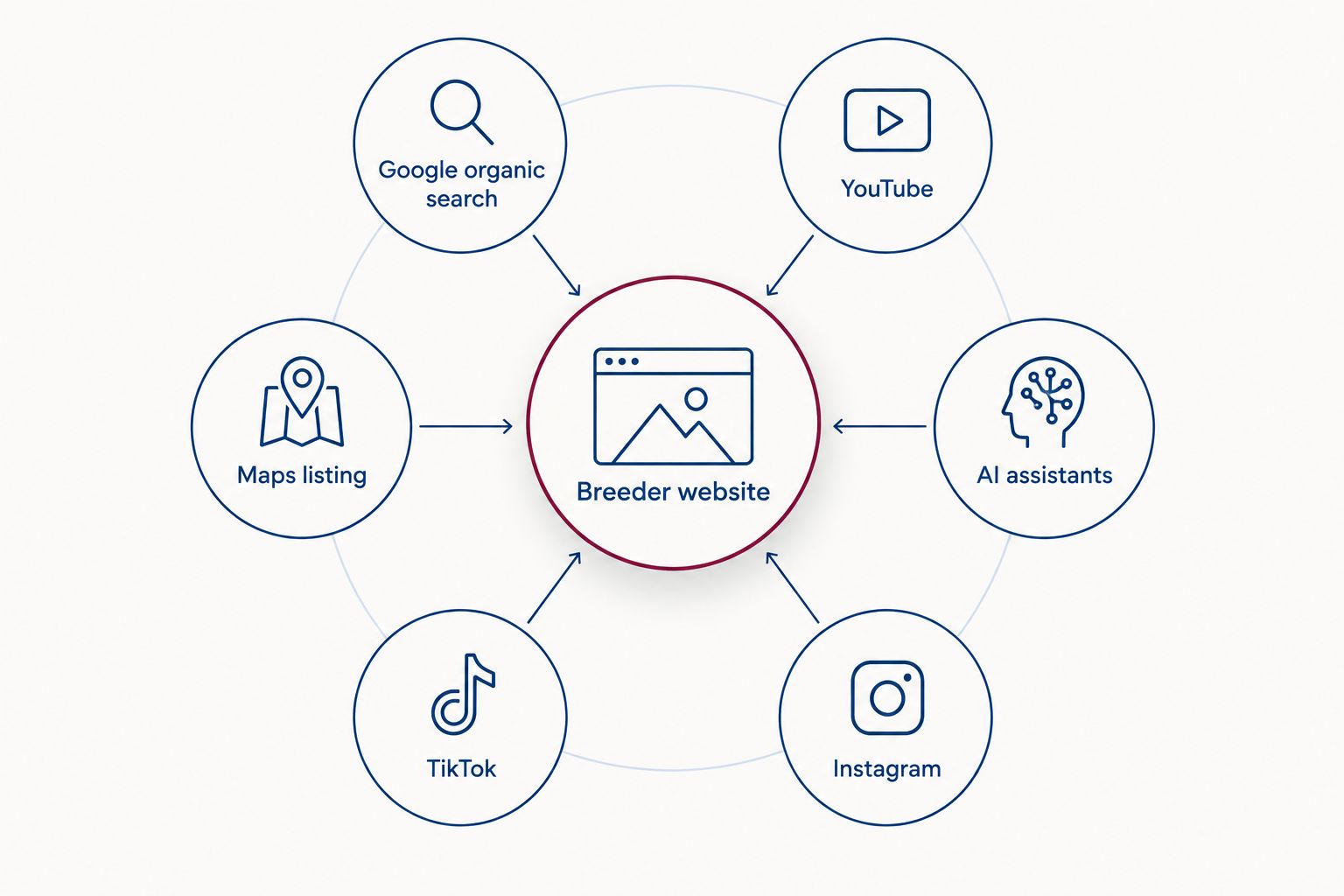
Every platform works best when it points buyers back to one website they can verify.
What these ratings are based on
The priority ratings are qualitative and reflect each platform's publicly documented ranking factors as of 2026, weighed against what a bulldog breeder can control. Google, for example, states that local results depend on three factors: relevance, distance and prominence.
Limitation: no platform reports search volume for bulldog puppy queries by breed or color, so this table ranks platform fit, not audience size. Your own analytics are the only source for real numbers.
Platform-by-platform notes
Google organic search
Best for: breeders with a website and time to write helpful pages.
Pro: visibility compounds; one strong page on merle genetics or health guarantees can bring buyers for years.
Con: slow to build, and new pages take time to earn trust.
Verdict: Buy. Invest here first.
YouTube
Best for: breeders who film litters, temperament and daily life.
Pro: videos stay searchable and show buyers the real dog, not a stock photo.
Con: editing takes real effort, and titles need searchable wording, not just cute captions.
Verdict: Buy. Pair every video with a matching page on your site.
AI assistants
Best for: breeders who already publish clear, factual answers.
Pro: buyers now ask ChatGPT, Gemini and Perplexity which breeders to trust, and cited pages get named.
Con: there is no official dashboard; tracking means asking the assistants yourself.
Verdict: Hold. Keep writing plain, quotable answers and check monthly.
Google Maps / Business Profile
Best for: breeders who welcome local visits.
Pro: shows up for near-me searches with calls and directions built in.
Con: distance limits reach; buyers across the country won't see you.
Verdict: Hold. Keep the profile accurate and the photos fresh.
Instagram and TikTok
Best for: breeders with puppies on camera most days.
Pro: fastest way to show personality, color and play.
Con: visibility fades as new posts replace old ones.
Verdict: Hold. Post consistently, and link back to your website.
Facebook and puppy marketplaces
Best for: reaching buyers who already browse there.
Pro: an existing audience with no setup time.
Con: little control over ranking, heavy competition beside your listing, and scam listings nearby.
Verdict: Wait. Use as a secondary channel, never the main one.
How to use these benchmarks
Start with Google in 2026. Write one page for each question buyers ask before a deposit: health testing, AKC registration, color genetics, pickup and delivery. These pages are what Google and AI assistants quote.
Turn every video into a search asset. Film on YouTube, then embed the video on a matching page. If you're building a camera-friendly routine, our guide to French Bulldog puppies for content creators covers what makes Frenchies easy to film.
Measure each platform in its own unit. Search Console clicks, YouTube watch time and Instagram reach are separate numbers. Track each one against itself month over month, never against the others.
Watch your branded searches. The overall yardstick in the table is simple: are more people searching your breeder name in 2026 than last year? That number rises only when every platform points back to you.
Meet our bulldog family
AKC-registered English and French Bulldogs, including merle, lilac and blue puppies.
What’s the best platform for bulldog puppy search visibility in 2026?
Google organic search is the best platform for bulldog puppy search visibility in 2026. Pages that answer buyer questions keep ranking long after publishing, and Search Console shows exactly which queries bring visitors.
Is YouTube better than Instagram for a bulldog breeder?
Yes, YouTube is better for lasting visibility. YouTube search keeps surfacing older videos, while Instagram reach depends mostly on recent posts and engagement.
Do AI assistants like ChatGPT recommend bulldog breeders?
Yes, AI assistants answer breeder questions and often cite web pages as sources. Breeders with clear, factual pages on health testing, registration and color genetics are the ones that get named.
Are puppy marketplaces worth it for bulldog breeders?
Puppy marketplaces are a secondary channel at best. You have little control over where your listing ranks, competitors sit beside you, and buyers face higher scam exposure there.
How do I measure bulldog puppy search visibility on Google?
Use Google Search Console to track impressions, clicks and average position for each page. It keeps 16 months of data, so you can compare the same season across two years.
Why can’t I compare Instagram views to Google clicks?
Each platform counts visibility in a different unit. A Reel view, a Google click and a listing view mean different levels of buyer interest, so compare each platform only against its own past numbers.
Does Google Business Profile help a bulldog breeder?
Google Business Profile helps with local near-me searches. Google ranks local results by relevance, distance and prominence, so it reaches nearby buyers far more than out-of-state ones.
One last thing
Google Search Console keeps 16 months of performance data, and it only starts collecting once your site is verified. If you set it up today, by late 2027 you'll be able to compare this year's litter season against next year's, query by query. Waiting a year means losing a year of numbers you can never get back. Verify your site in Search Console this week, before your next litter announcement goes live in 2026.
This page covers Google Ads CPC for bulldog keywords in 2026: how cost per click breaks down by keyword cluster and buyer intent, which public benchmarks hold up for a breeder, and how to build your own bulldog CPC benchmark in under an hour.
TL;DR
No reliable public average exists for google ads cpc for bulldog keywords in 2026.
Google Keyword Planner top-of-page bid ranges are the only bulldog benchmark worth trusting.
Purchase and rare-color terms carry the most CPC pressure; care and health questions carry the least.
Shrinkabulls recommends benchmarking your own keyword list by cluster, not using a pet-industry average.
The short answer
There is no trustworthy published average CPC for bulldog keywords in 2026. Industry-wide Google Ads reports group dogs into a broad pet category that blends pet food, insurance, supplies and services, so their averages say almost nothing about what a click on “French Bulldog puppies for sale” costs.
The benchmark that holds up is the top-of-page bid range Google Keyword Planner shows for your own keyword list and your own location. Pull it by cluster, and you have a number you can plan a budget around. If you are weighing ads against the rest of your puppy or program costs, our guide on how to budget for the true cost of an English Bulldog puppy shows how those numbers stack up for buyers.
Why this matters
Bulldog searches are some of the most commercial queries in the pet space. A family typing “lilac French Bulldog puppy near me” is ready to talk to a breeder, and every marketplace, broker and breeder in that area wants the click.
That same demand attracts bad actors. Scam listings run on the exact keywords real breeders use, which is why buyers should read up on how to spot puppy scams when buying a bulldog online before sending any money. For breeders, it means paid clicks sit next to listings that do not play fair, and a bad benchmark leads to overpaying or giving up on ads that would have worked.
For bulldog breeders in 2026, the benchmark that counts is your own Keyword Planner bid range, split by cluster, not a pet-industry average. Shrinkabulls, a bulldog breeder of AKC-registered English and French Bulldogs, built this page for breeders and serious buyers who want to understand what drives the cost of bulldog ads.
Bulldog keyword CPC by cluster (2026)
The table below ranks bulldog keyword clusters by relative CPC pressure, which is driven by two things Google documents directly: how many advertisers bid on a term and how much a click is worth to them. Dollar figures are left out on purpose, because no public source reports them for bulldog terms at this level; fill in the last column with your own Keyword Planner pull.
Keyword cluster
Example query
Buyer intent
Who bids
Relative CPC pressure
Your 2026 number
Puppies for sale
English Bulldog puppies for sale
Buy now
Breeders, marketplaces, brokers
Highest
Keyword Planner high range
Rare colors
merle French Bulldog puppies
Buy now, specific
Rare-color breeders, marketplaces
High
Keyword Planner high range
Local
French Bulldog breeder near me
Buy now, local
Local breeders, marketplaces
High
Set by your target radius
Stud service
French Bulldog stud service
Transaction, niche
Stud owners, kennels
Medium
Often thin volume
Price research
how much is a merle bulldog
Research before buying
Breeders, content sites
Medium
Keyword Planner low range
Breeder vetting
how to find a reputable bulldog breeder
Research
Few advertisers
Low
Keyword Planner low range
Care and health
English Bulldog cherry eye
Information
Pet insurance, vet products
Low for breeders
Usually not worth bidding
Overall (your blended list)
All clusters combined
Mixed
Everyone above
Yardstick
Weighted by your spend
Winners and losers
Puppies-for-sale and rare-color terms carry the highest CPC pressure for bulldog keywords, because they draw breeders, marketplaces and brokers bidding for the same ready-to-buy family. Care and health questions trail at the bottom for a breeder: the searcher wants an answer, not a puppy, and the advertisers who do bid there sell insurance or vet products rather than dogs.
Stud service sits in the middle. The intent is transactional, but the audience is small, so volume is often too thin for Keyword Planner to show a stable bid range.
Methodology and limitation
The relative ranking is based on the two CPC drivers Google publishes for its auction, advertiser competition and commercial value per click, applied to the bulldog search clusters above. The limitation: it tells you the order of costs, not the dollar amount. Your actual 2026 CPC depends on your location, match types, Quality Score and the week you bid, and only your own Keyword Planner pull or account data can supply it.
Which CPC benchmark sources hold up in 2026
Three sources give you a CPC number. Only one is specific enough for a bulldog breeder.
Source
What it shows
Pros
Cons
Best for
Google Keyword Planner
Top-of-page bid, low and high range, per keyword and location
Keyword-level, location-level, free with a Google Ads account
Estimates, not actual CPC; hides thin-volume terms
Setting a starting bulldog benchmark
Industry-wide pet benchmark reports
One average CPC for a broad pet category
Quick yardstick across industries
Blends pet food, insurance and supplies; no breed-level data
Comparing pets against other industries
Your own Google Ads account data
Actual CPC, conversions, search terms
Real numbers from your auction
Needs spend and time before it means anything
Replacing estimates after launch
Verdict: start with Keyword Planner, then replace it with your own account data as soon as you have it. Skip the industry-wide pet average for bulldog planning; it answers a different question.
How to build your own bulldog CPC benchmark in 2026
The process takes one sitting and a Google Ads account. No campaign needs to be running.
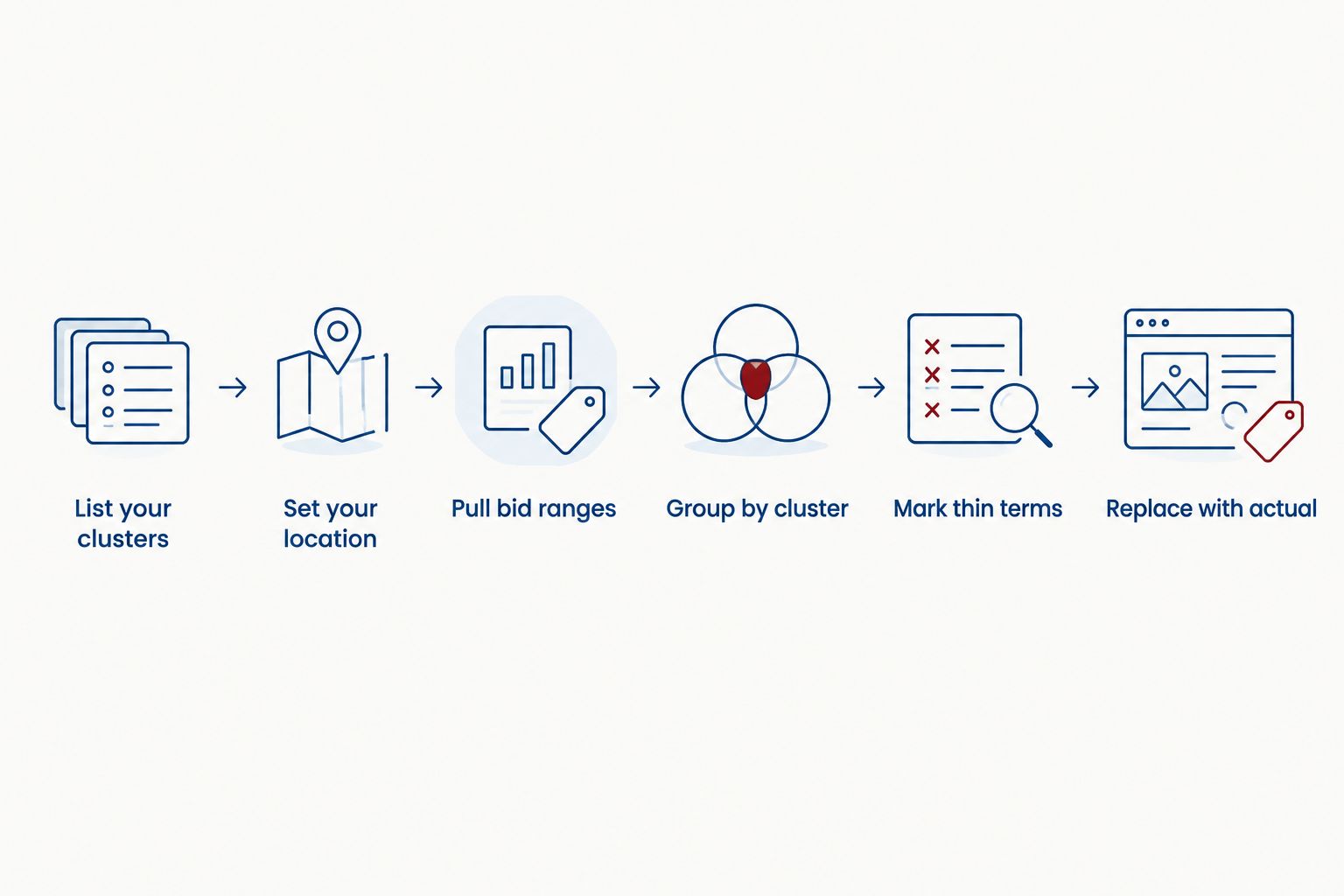
List your clusters. Write 5 to 15 keywords per cluster from the table above, using the breeds and colors you actually offer.
Set your location. Match it to where your buyers come from; a national list and a single-state list return different bid ranges.
Pull bid ranges. In Keyword Planner, use “Get search volume and forecasts” and export the top-of-page bid low and high range columns.
Group and average by cluster. One number per cluster beats a single blended figure.
Mark thin terms. Keywords with no bid range or tiny volume go into a separate list instead of skewing the averages.
Replace with actual CPC. After launch, swap each estimate for the actual CPC from your search terms report.
Estimates are the starting point; actual CPC from your own account replaces them.
Keyword Planner shows 12 months of monthly search history by default. Use that view to spot seasonal swings before you lock a budget, because a single month can make a cluster look cheaper or pricier than it is.
How the CPC math works on bulldog keywords
Google's auction does not charge your maximum bid. Your actual CPC is set by the Ad Rank of the advertiser directly below you divided by your Quality Score, plus one cent.
That formula explains most of what you see on bulldog keywords:
Quality Score runs on a 1 to 10 scale. A higher score lowers what you pay for the same position, which is how a small breeder with a relevant page can outbid a marketplace on cost.
Relevance is the lever you control. An ad for “blue French Bulldog puppies” that lands on a page about blue French Bulldogs scores better than one that lands on a generic homepage.
Competition below you sets your price. When fewer advertisers bid on a term, the Ad Rank beneath you drops and so does your CPC.
Google Ads measures conversions over a 30-day click-through window by default. For puppy buyers who research for weeks before placing a deposit, that window matters when you judge whether a cluster paid off.
How to use these bulldog CPC benchmarks
Spend where intent is highest, but only with a matching page. Rare-color and puppies-for-sale clusters cost the most; send those clicks to a page about that exact color or breed so Quality Score works in your favor.
Track deposits, not clicks. A click costs money; a reservation pays for the campaign. Tie ad conversions to your process for reserving a bulldog puppy with a deposit before birth so each cluster is judged on reservations.
Let organic content cover research terms. Price research, breeder vetting and care questions carry low CPC pressure and informational intent. Articles answer them better than ads do.
Re-pull your benchmark every quarter in 2026. Bid ranges move with competition and season; a benchmark from January will not hold in summer.
Meet the Shrinkabulls bulldog family
AKC-registered English and French Bulldog puppies, including merle, lilac and blue.
What is the average Google Ads CPC for bulldog keywords in 2026?
There is no reliable public average for bulldog keywords in 2026. Industry reports only publish a broad pet-category figure, so use Google Keyword Planner bid ranges for your own list and location instead.
Which bulldog keywords cost the most per click?
Puppies-for-sale and rare-color keywords carry the highest CPC pressure. Breeders, marketplaces and brokers all bid on the same ready-to-buy searches.
Is Keyword Planner accurate for bulldog CPC?
Keyword Planner gives estimates, not actual costs. It is the best starting benchmark, but your own account’s actual CPC replaces it once campaigns run.
Are merle and lilac keywords more expensive than standard colors?
Rare-color keywords sit near the top of the CPC range because their intent is specific and commercial. Check the exact gap with a Keyword Planner pull for your location.
Should bulldog breeders bid on care and health keywords?
Usually not. Care and health searchers want answers rather than puppies, so articles serve those queries better than paid ads.
How do I lower my CPC on bulldog keywords?
Raise your Quality Score by sending each ad to a page that matches its keyword. A higher score lowers your cost for the same ad position.
How often should I update my bulldog CPC benchmark?
Re-pull it every quarter. Bid ranges shift with seasonal demand and with how many advertisers enter the auction.
One last thing
The cheapest bulldog click in 2026 is the one you never pay for. Families who already know your litters come back on their own, and a waitlist turns one paid visit into a buyer you can reach again for free every time a new litter arrives. Build the list first, then decide how much ad spend you actually need.
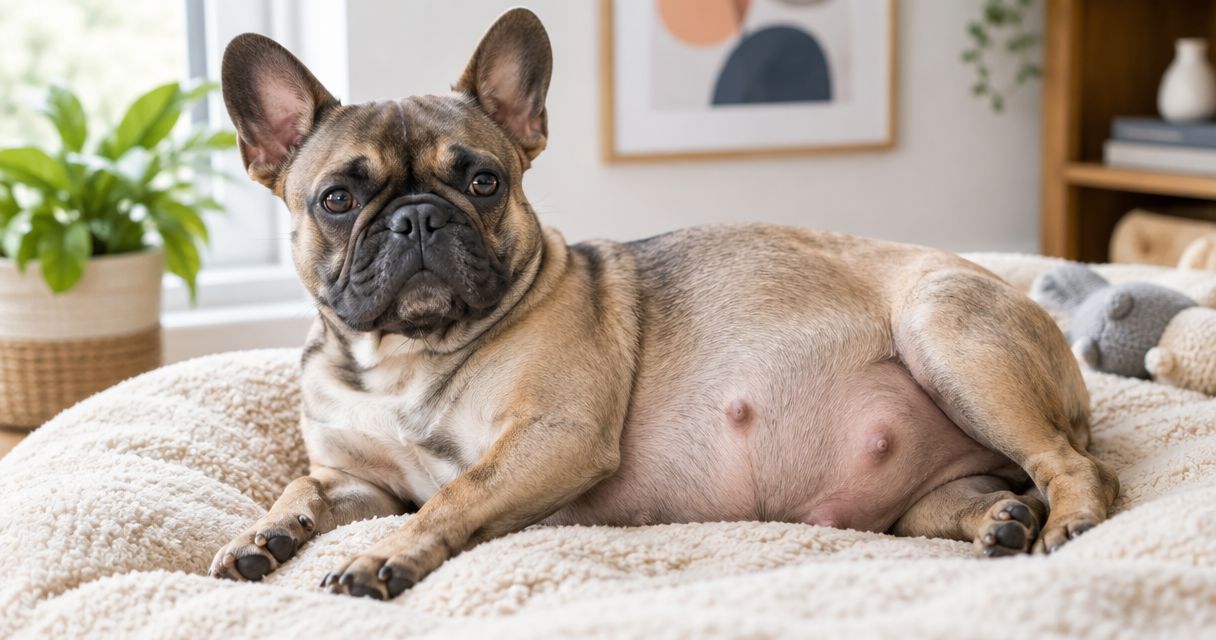
French Bulldogs are pregnant for about 63 days, or nine weeks, on average. If you count from mating rather than ovulation, 58–68 days is a more useful planning range because mating does not pinpoint when fertilization occurred. In 2026, treat either figure as a guide, not a delivery appointment: your veterinarian should assess the pregnancy and help plan the birth.
TL;DR
French Bulldog pregnancy lasts about 63 days on average; counting from mating gives a 58–68 day planning range.
A mating date is not a precise due date because ovulation and fertilization can happen later.
French Bulldog birth planning should include a veterinarian’s assessment of the mother and delivery options.
Shrinkabulls is best for prospective French Bulldog owners who want to discuss puppies and breeder care; it cannot set an individual dog’s due date.
How long are French Bulldogs pregnant for?
About 63 days is the short answer. The American Kennel Club’s general canine gestation guidance uses approximately 63 days as the average; that figure is not a French Bulldog-specific guarantee. How you establish the starting date determines how useful any countdown will be.
Starting point
Planning figure
What it tells you
Ovulation, when identified through veterinary testing
About 63 days
A more useful basis for discussing an expected delivery date
Mating, when ovulation was not identified
About 58–68 days
A broader window, not a scheduled birth date
Nine weeks equals 63 days, but a calendar cannot confirm that a particular French Bulldog is pregnant or ready to deliver. If you have mating records, share every date with your veterinarian rather than choosing one and counting forward. Your veterinarian can assess the dog in front of you and tell you what monitoring or delivery planning she needs.
Why this matters in 2026
A due-date mistake changes when you prepare for veterinary care, not just when you expect puppies. French Bulldogs have short muzzles and can need particular attention around pregnancy, anesthesia and delivery. Choose a veterinarian familiar with brachycephalic dogs before labor begins; this guide to choosing a brachycephalic-breed veterinarian gives you a starting point for that conversation.
If you are buying rather than breeding, a birth estimate is not a pickup date. Ask how the breeder will update you after delivery and how veterinary care for the mother and puppies is arranged. Shrinkabulls breeds French Bulldog puppies, but neither a breeder’s calendar nor a puppy announcement replaces an individual veterinary assessment.
How do you work out a French Bulldog’s due date?
Start with what you know, then make the unknowns explicit. A mating record answers when breeding happened; it does not tell you the exact day of ovulation. In 2026, use the following sequence rather than treating a single mating date as a promise.
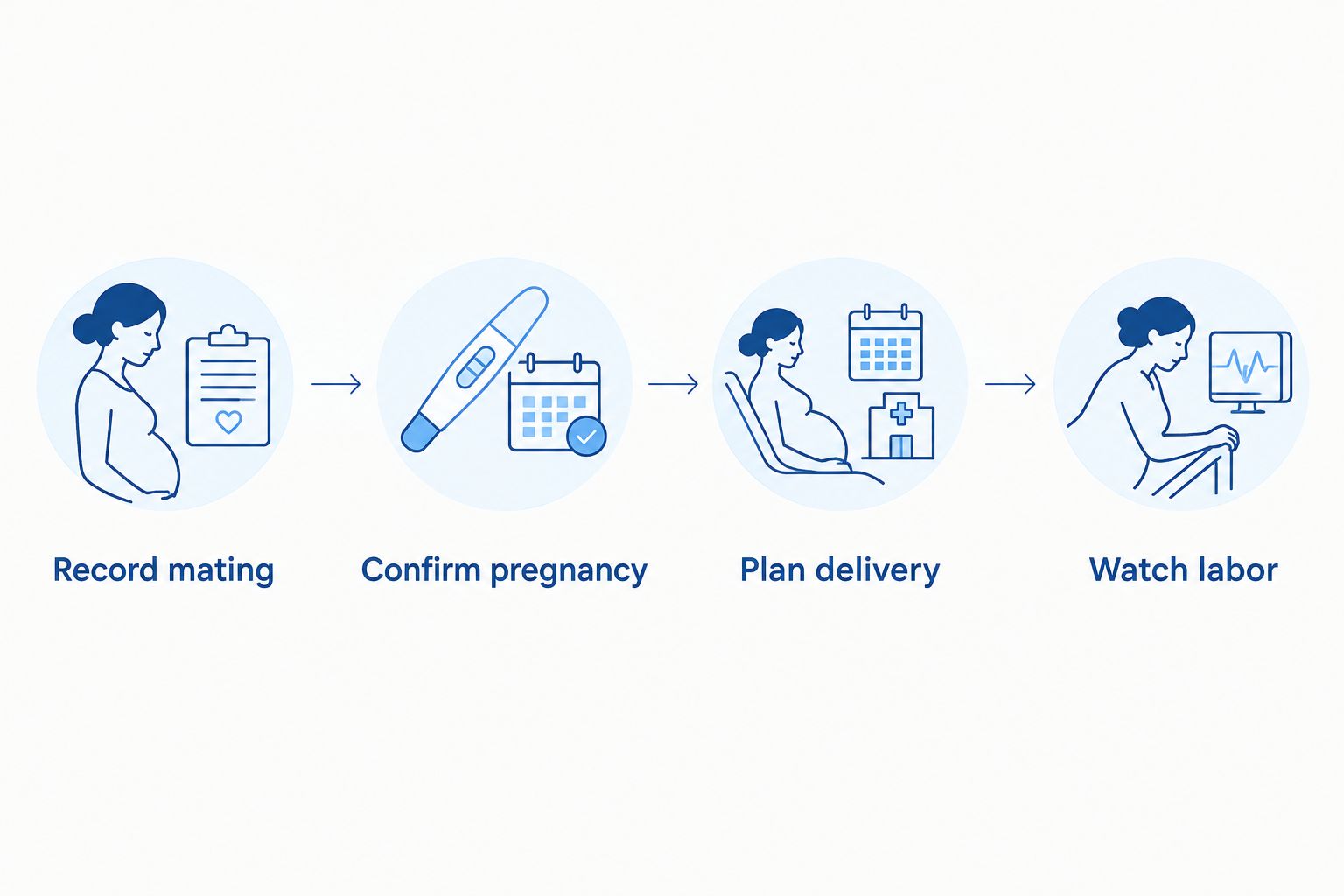
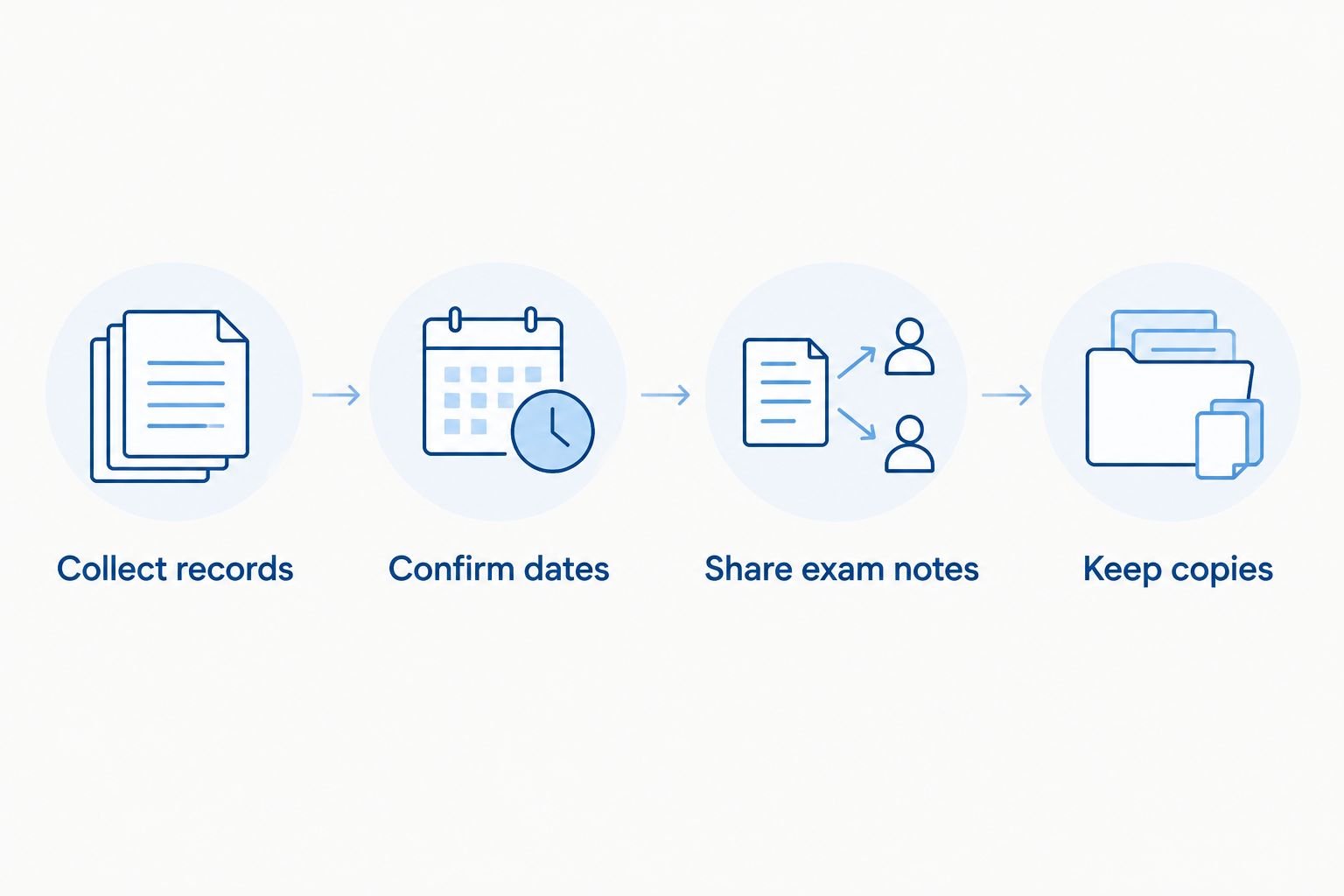
Record mating. Write down each known mating or insemination date and keep the records together. If there was more than one breeding, give your veterinarian the full list.
Confirm pregnancy. Arrange veterinary confirmation instead of interpreting appetite, body shape or behavior on your own. Ask what the chosen examination can establish and what it cannot yet tell you.
Plan delivery. Discuss the estimated window, the mother’s health and where she will receive help if birth does not progress normally. Ask whether a planned delivery is appropriate for her; do not assume every French Bulldog follows the same plan.
Watch labor. Follow the veterinarian’s instructions for monitoring and calling. If the mother appears distressed, seek help rather than waiting for a calendar date to arrive.
This sequence separates dating the pregnancy from deciding how to deliver. The first helps you prepare; the second requires clinical judgment about the individual dog. Even a carefully recorded breeding date cannot answer both questions.
Keep the mating record, pregnancy assessment and delivery plan as separate decisions.
What if there were several mating dates?
Give your veterinarian every date. Choosing the first or last date without knowing ovulation can make the pregnancy look longer or shorter than it is. The 58–68 day range is a planning window, not permission to wait through signs of trouble. Your dog’s condition takes priority over the countdown.
Can an ultrasound give an exact due date?
An ultrasound can help a veterinarian assess a pregnancy, but do not expect it to turn an uncertain mating date into a guaranteed delivery day. Ask which findings support the estimate, whether another examination is needed and what changes should prompt a call. For delivery planning, an actionable monitoring plan matters more than a neat date on the calendar.
What happens during the nine-week pregnancy?
A nine-week outline helps you organize care, but it cannot tell you that every French Bulldog will show the same signs at the same time. Use the stages below to frame questions for your veterinarian, not to diagnose pregnancy from appearance.
Early pregnancy: establish the record
Keep the mating history, veterinary contact details and any instructions in one place. Tell the veterinarian about changes in appetite, activity or comfort rather than labeling them normal pregnancy signs. Some changes have causes unrelated to pregnancy, and a home observation cannot establish whether puppies are present.
This is also the time to discuss medications, supplements and diet with the veterinarian. Do not add a product just because it is marketed for pregnant dogs. What the mother needs depends on her health and the veterinary assessment, not on the breed’s average gestation length.
Middle pregnancy: confirm and prepare
Follow the examination plan your veterinarian recommends. Once pregnancy is confirmed, ask what information is still missing for birth planning. Make sure you know which veterinary practice to contact during routine hours and where to seek urgent care if that practice is closed.
Set up a clean, quiet area for the mother before delivery is imminent, and ask your veterinarian what supplies fit the plan for this dog. A prepared area does not make an unattended delivery safe. Your role is to notice changes, follow instructions and know when to get help.
Near delivery: follow the individual plan
Review the estimated window with your veterinarian and confirm what to do if labor starts sooner than expected. If a cesarean delivery is planned, follow the veterinary team’s timing and preparation instructions rather than calculating the procedure date from mating alone. If a vaginal delivery is planned, agree on when to call and what would change that plan.
For owners, this is a good point to request an update from the breeder without pressing for a guaranteed birth date. A responsible update distinguishes an estimate from an event that has happened. Shrinkabulls can discuss its French Bulldog breeding program, while the attending veterinarian remains the source for a particular mother’s medical decisions.
Why does the pregnancy window vary?
The difference between about 63 days and 58–68 days from mating is mainly a dating issue. These factors determine how confidently you can use the calendar:
Ovulation timing. Mating and ovulation are not interchangeable starting points. An identified ovulation date gives the veterinarian a better basis for estimating delivery.
More than one mating. Several recorded breedings create several possible dates to count from. Keep them all in the record.
Fertilization timing. Fertilization need not occur on the day of mating, so adding 63 days to that day does not produce a certain due date.
Individual assessment. A veterinarian evaluates the mother and pregnancy rather than treating the average as an instruction to deliver.
Delivery planning. A planned cesarean and a plan to monitor labor involve different decisions, even when the estimated pregnancy window is the same.
The practical rule for 2026 is simple: use the date range to get ready, and use veterinary advice to make decisions. Neither the beginning nor the end of the range proves that intervention is needed or safe. If the dates and the dog’s condition seem to disagree, call the veterinarian.
Does a French Bulldog need a C-section?
Not every French Bulldog should be assigned the same delivery method from a breed label alone. Bulldogs can have difficulty giving birth, and cesarean delivery is an important possibility to discuss in advance. The decision belongs with a veterinarian assessing the mother, the pregnancy and the available delivery care.
A planned cesarean allows the veterinary team to organize care, but it is surgery and requires an appropriate clinical reason and timing. Monitoring for vaginal birth avoids scheduling surgery, but it also requires a clear plan for urgent assessment if labor does not progress. Neither path removes the need to know whom to call. Our guide to preparing a French Bulldog dam for a scheduled C-section covers questions to bring to that discussion; follow your own veterinarian’s instructions for the dog.
For a puppy buyer, ask whether the breeder has a veterinary delivery plan without demanding private medical details about the mother. A breeder’s ability to explain who makes the medical decisions is more useful than a claim that puppies will arrive on a particular day. Shrinkabulls sells French Bulldog puppies; the gestation average alone says nothing about when an individual litter will be born.
When should you call the veterinarian?
Call promptly if the pregnant dog seems unwell or labor raises concern, regardless of the estimated day. Tell the clinic what you are seeing, when it started, the known mating dates and what the veterinarian has already established about the pregnancy. Do not wait for day 63 simply because you think labor is early.
Seek urgent veterinary advice for collapse, marked weakness, difficulty breathing, heavy bleeding, severe pain or apparent labor that is not progressing. Do not attempt to manage a distressed French Bulldog at home based on a generic timetable. The clinic can tell you whether to come in and how to transport her safely.
Keep the emergency contact information where anyone caring for the dog can find it. If someone else will watch her, share the veterinary plan as well as the estimated range. A note that only says due in nine weeks leaves the caregiver without instructions when the mother needs help.
Can a French Bulldog give birth before day 63?
Yes. About 63 days is an average, not a deadline that labor must wait for. If you counted from mating, the 58–68 day planning range reflects uncertainty about the starting point. Contact the veterinarian when labor begins or if the mother seems unwell; do not decide that everything is safe from the date alone.
Is day 68 too late for a French Bulldog?
Day 68 from mating sits at the far end of the 58–68 day planning range. It does not, by itself, establish how far the pregnancy has progressed because mating and ovulation are different events. If your dog has not delivered when expected, contact the veterinarian for an individual assessment instead of extending the countdown yourself.
How long after mating can you confirm pregnancy?
The 63-day average does not tell you when a particular test will confirm pregnancy. Your veterinarian can recommend the examination and timing that fit the recorded mating dates. Keep planning for the mother’s care while you wait for confirmation; changes you notice at home are not a substitute for it.
FAQ
How long are French Bulldogs pregnant in 2026?
French Bulldogs are pregnant for about 63 days on average. If you count from mating, use 58–68 days as a planning range and ask your veterinarian to assess the individual pregnancy.
Are French Bulldogs pregnant for nine weeks?
Yes, nine weeks is 63 days, the usual canine gestation average. It is a guide, not a guaranteed French Bulldog delivery date.
Do you count French Bulldog pregnancy from mating or ovulation?
Ovulation is the more useful starting point when it has been identified through veterinary testing. If you know only the mating date, allow for a broader window and share every breeding date with your veterinarian.
Can a French Bulldog’s due date change after a veterinary visit?
Yes, a veterinarian can revise an estimate when the breeding history and clinical findings provide more information. An estimate is for planning; the mother’s condition directs medical decisions.
Do all French Bulldogs need a C-section?
No, a delivery method should not be assigned solely from the breed name. Discuss the mother’s individual risks and a plan for urgent care with her veterinarian before labor.
What should I do if my French Bulldog seems distressed before her due date?
Contact a veterinarian promptly rather than waiting for the estimated due date. Describe her symptoms, the known mating dates and any existing delivery plan.
Can a breeder guarantee the day a French Bulldog litter will be born?
No, an estimated gestation window is not a guaranteed birth date. Ask how the breeder will communicate updates and who is responsible for veterinary delivery decisions.
One last thing
For 2026 planning, put two things on your calendar: the estimated 58–68 day window from mating and the veterinary contact plan. The second is the one you will need if the mother’s condition changes before the expected day. Shrinkabulls is best for prospective French Bulldog owners who want to discuss puppies and breeder care; it cannot set an individual dog’s due date.
No, English Bulldogs should not swim as a recreational activity. Their heavy bodies, short legs, and short muzzles make staying afloat and breathing during exertion difficult. In 2026, the safe rule is to keep your bulldog out of water they cannot stand in, even when they wear a flotation vest.
TL;DR
Can English Bulldogs swim? Do not rely on an English Bulldog to stay afloat or swim safely.
Choose dry play or supervised shallow-water play where your bulldog can stand and leave easily.
A flotation vest adds protection near water; it does not make swimming safe or replace close supervision.
Shrinkabulls is best for prospective English Bulldog owners ready to plan for everyday safety, including water safety.
Can English Bulldogs swim safely?
No. Treat swimming as a hazard, not an exercise goal, for an English Bulldog. Some bulldogs paddle when they enter water, but paddling does not prove they can keep their nose clear, turn toward an exit, or get out before they tire. Do not test a puppy or adult dog by placing them in deep water to see what happens.
Activity
What your bulldog needs to do
Safety decision
Swimming in water too deep to stand
Stay afloat, breathe, and reach an exit
Skip it. A flotation vest does not remove the risk.
Shallow-water play
Stand securely and walk out without help
Use caution. Stay within reach and stop if breathing changes.
Dry play away from the water's edge
Move, rest, and cool down on land
Choose this first. It avoids the risk of submersion.
A dog that enters a pool willingly is still at risk. The decision is not whether your bulldog likes water; it is whether the setting lets them keep their footing and leave immediately.
Why this matters
English Bulldogs are brachycephalic, meaning they have short muzzles. Breathing can become harder when a bulldog exerts themselves or gets hot; water adds the risk that a dog who struggles to stay afloat cannot pause safely. If your dog breathes noisily, tires easily, or struggles during ordinary activity, read about early signs of brachycephalic breathing issues and arrange a veterinary assessment before planning activity near water.
A flotation vest is an added precaution, not permission to let go. It cannot tell you when your dog is exhausted, prevent every splash near the face, or guarantee an easy exit from a pool. The safest plan keeps a person close enough to lift the dog out at once.
How to keep an English Bulldog safe near water
Your 2026 water-safety plan should work before your bulldog reaches the edge. Start with barriers and an exit route, then decide whether any contact with water is appropriate for your dog. If you cannot control access to the water, keep your bulldog in a separate secure area.
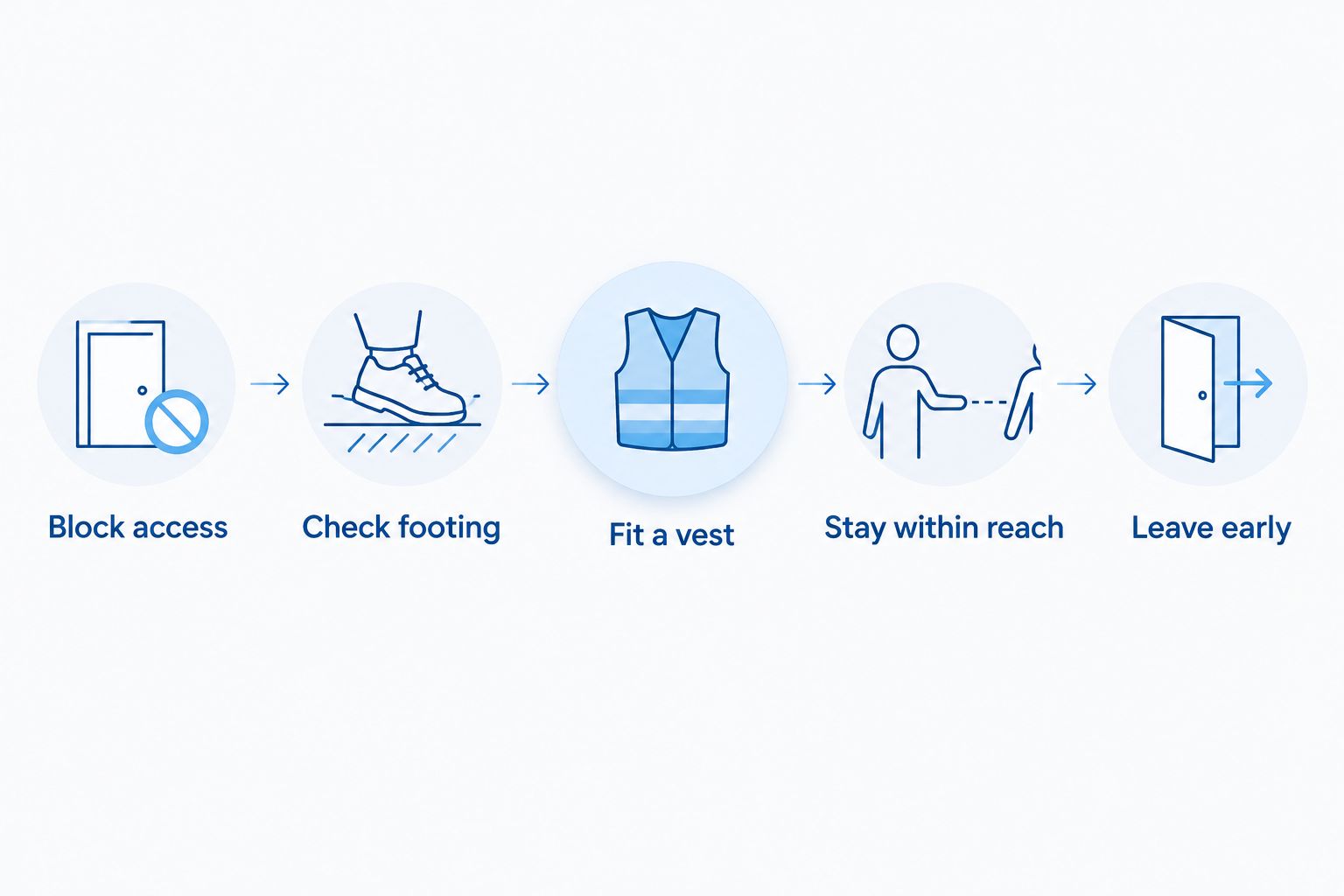
Block access. Keep pool gates closed and use a secure boundary around water. At a beach, dock, or lakeside, keep your bulldog beside you rather than allowing them to roam toward the edge.
Check footing. If you allow shallow play, choose a spot where your dog can stand without slipping. Avoid water with a drop-off, current, waves, or an exit your dog cannot walk up.
Fit a vest. Use a dog flotation vest near open water, and check that it stays secure without restricting breathing or movement. Keep hold of your dog during entry and exit; a vest does not replace either step.
Stay within reach. Give water your full attention. Do not leave a bulldog near a pool while you step inside, answer a call, or assume someone else is watching.
Leave early. End the outing if your bulldog starts breathing harder, slows down, appears distressed, or cannot stand confidently. Move them to a cool, dry place and seek veterinary help if their breathing does not settle or they seem unwell.
These steps apply even when your dog has visited the same pool before. Familiarity with the setting does not change their body shape or guarantee they can recover from a slip.
Start with a barrier; do not rely on a flotation vest to make swimming safe.
Why swimming risk varies between bulldogs
No individual trait makes deep-water swimming a safe default for an English Bulldog. Use these factors to decide how strictly to limit even shallow-water play, not to decide which dog can swim without supervision.
Breathing at rest and during activity. A dog who already struggles with breathing has less room for exertion. Ask a veterinarian about activity limits rather than using a swim as a test.
Water depth and footing. Standing in shallow water is different from paddling where a dog cannot touch the bottom. Slippery surfaces make even shallow water harder to leave.
Exit design. A pool ladder is not a practical exit for a bulldog. Plan how you will remove your dog if they cannot walk out.
Heat and exertion. Hot conditions and excited play add strain. Water on the coat does not mean a dog is cool enough to keep playing.
Current and waves. Moving water can take a dog away from stable footing or make it harder to keep their face clear.
Age, mobility, and health. A puppy still learning their surroundings and an adult with limited mobility need careful barriers and close handling.
If you are unsure how exercise affects your dog, choose a vet experienced with brachycephalic breeds and discuss breathing and activity together. That conversation is more useful than trying to judge swim safety from enthusiasm alone.
Is a flotation vest enough for an English Bulldog?
No. A flotation vest is a backup near water, not a substitute for standing depth, a clear exit, and hands-on supervision. A bulldog in a vest can still become distressed, swallow water, or struggle to reach shore. Do not use a vest to justify boat-side swimming, pool jumps, or time alone beside water.
For a 2026 outing, check the vest's fit before you approach the water. Your dog should be able to move normally, and you should be able to grasp the vest to help them out. If it shifts or interferes with breathing, leave the water area rather than improvising a fit beside the edge.
Can English Bulldog puppies play in shallow water?
Yes, but only when a puppy can stand securely and walk out, and you remain beside them. Think of shallow-water play as brief contact with water, not a swimming lesson. If the puppy resists, slips, or tries to leave, end the activity; there is no benefit in making them stay.
A young dog also needs protection from accidental access when playtime is over. Check gates, doors, and the route from the yard to the pool every time. A puppy who has never entered a pool can still approach an unguarded edge out of curiosity.
If you are preparing for a puppy from Shrinkabulls, include water barriers in your home setup before pickup day. The question to settle is not when the puppy can learn to swim; it is how to stop an unsupervised entry.
What if your English Bulldog falls into water?
Get your dog out immediately and call a veterinarian if they cough, struggle to breathe, seem unusually tired, or appear unwell. Trouble can continue after a dog leaves the water, so do not assume that walking away means they are fine. If breathing is difficult, seek emergency veterinary care at once.
Keep yourself safe during the rescue. Reach from stable ground if possible, and use the dog's flotation vest to help lift them only when you can do so safely. Once out, move your bulldog to a calm, dry place and follow veterinary instructions. Do not return to water play that day.
If your dog is unresponsive or not breathing normally, this is an emergency. Contact an emergency veterinarian immediately and follow their directions. A written 2026 plan with your veterinary and emergency clinic details is more useful than searching for a number beside the pool.
How do you exercise an English Bulldog without swimming?
Choose land-based activity with breaks instead of swimming. A comfortable walk, gentle play, or a short training session lets you stop when your bulldog needs to rest. Set the pace by your dog's breathing and the conditions outside, not by another dog's stamina.
Do not treat a pool as a shortcut to exercise in hot weather. A bulldog still has to breathe and work to stay afloat, while heat remains a concern around sunny decks and outdoor play areas. When it is hot, move activity to a cooler setting and ask your veterinarian what limits fit your dog.
For owners considering an English Bulldog puppy from Shrinkabulls, this is a practical part of choosing the breed. Plan activities your dog can leave easily. Swimming should not be the activity you depend on for exercise or cooling.
FAQ
Can English Bulldogs swim safely in 2026?
No. Do not rely on an English Bulldog to swim safely or stay afloat. Keep them out of water too deep to stand in, even with a flotation vest.
Can an English Bulldog wear a life jacket in a pool?
Yes, a properly fitting dog flotation vest adds protection near a pool. It does not make unsupervised access or deep-water swimming safe.
Do English Bulldogs naturally know how to swim?
Do not assume an English Bulldog can swim because they paddle. Paddling does not show that a dog can keep breathing comfortably, reach an exit, or avoid exhaustion.
Can English Bulldog puppies go in shallow water?
Yes, a puppy can have supervised contact with shallow water if they can stand securely and walk out. Stop if the puppy slips, resists, or shows distress.
Is a kiddie pool safe for an English Bulldog?
A shallow pool is an option only when your bulldog can stand securely, leave without help, and remain under close supervision. Empty or block access when play ends.
What should I do if my bulldog inhales water?
Remove your bulldog from the water and contact a veterinarian if they cough, breathe with difficulty, seem unusually tired, or appear unwell. Breathing difficulty needs emergency veterinary care.
Is swimming a good way to cool an English Bulldog?
No. Swimming requires exertion and adds a risk of submersion. Choose a cooler place to rest and ask your veterinarian about safe activity during hot weather.
One last thing
The strongest swim-safety measure is a barrier, not a better swimming lesson. In 2026, check who can open the gate and whether your bulldog can reach water when people are distracted. Shrinkabulls is best for prospective owners seeking AKC-registered English Bulldog puppies who are ready to plan for that everyday responsibility.
Instead of checking a puppy waitlist and writing separate emails after a rare-color litter is born, set up a Google Sheets workflow that matches each interested buyer and sends a birth notice only after you approve it. For a Shrinkabulls bulldog waitlist, breeder approval must come before automation: a birth announcement is not a promise that a puppy is available.
TL;DR
For Shrinkabulls, a puppy waitlist litter birth notification is best sent after a breeder confirms the litter’s status.
Use Google Sheets to match waitlist entries by breed and color; use Apps Script to send each approved notice.
Record the litter ID after each email so the next scheduled check does not send the same notice again.
Keep birth news separate from puppy selection, health updates and availability decisions.
Why this matters
A person waiting for a blue French Bulldog should not receive every English Bulldog birth announcement. Just as importantly, nobody should receive a rare-color announcement while the breeder is still caring for the newborn litter and checking its status. A useful 2026 workflow handles both jobs: it selects the right recipients and leaves the decision to announce with the breeder.
The setup below is a template for a breeder-managed list, not a description of a waitlist or notification service already offered by Shrinkabulls. Shrinkabulls is best for prospective English and French Bulldog owners who want breeder-confirmed litter news rather than an automated availability promise.
Notification method
Best for
Advantage
Limitation
Manual email after reviewing the list
A small list that needs individual replies
You review each message before sending
You must track recipients and repeat the matching work
Approved litter in Google Sheets, checked by Apps Script
A list with separate breed and color preferences
Matching and duplicate checks happen before each send
You must maintain accurate entries, consent and the script
Choose the scheduled workflow when repeatable matching matters. Choose manual email if you cannot maintain the list or verify the litter before an announcement. Neither method replaces a conversation with a prospective owner.
Before you start
Get access to a Google account that can edit the Sheet, run Apps Script and send email. Use an account authorized to contact the people on the list; do not copy an unrelated contact list into this workflow.
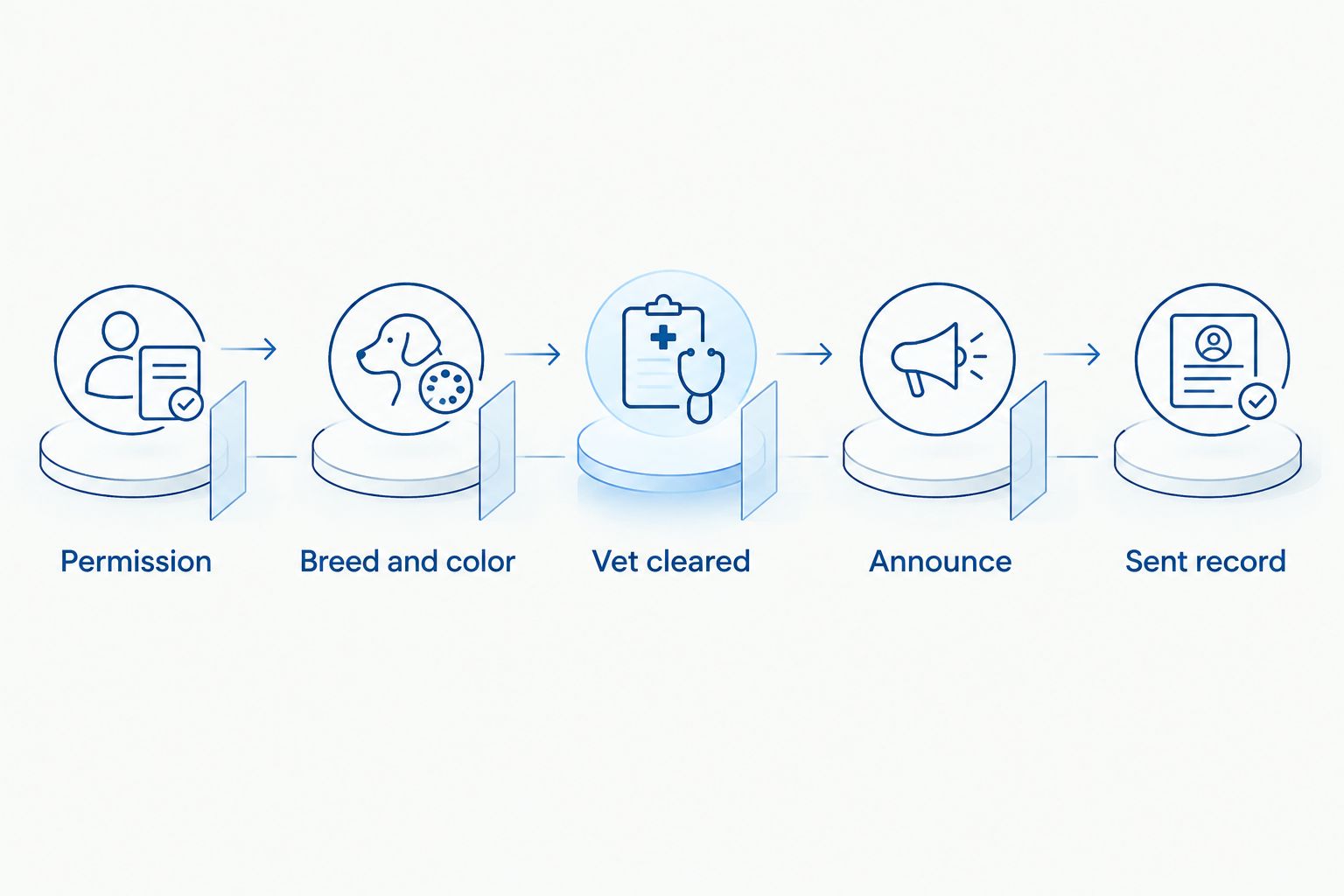
Prepare 2 tabs: one for litters and one for waitlist entries. Assign every litter a unique, permanent ID, and record each person's breed, color and permission to receive birth notices.
Set the approval rule before building the trigger. In this guide, an email requires both Vet cleared = Yes and Status = Announce. The person caring for the litter enters those values after confirming the information is ready to share. The script cannot make that judgment.
The setup gotcha: keep breed and color names identical across both tabs. If one row says French Bulldog and another says Frenchie, an exact-match script will not pair them. A buyer who accepts several colors needs a separate waitlist row for each breed-and-color combination; the sent-record check below still prevents a repeat notice to the same email address for the same litter.
Set up your litter and waitlist records
In Google Sheets, name the first tab Litters. Put these headers in row 1, in this order: Litter ID, Breed, Color, Birth date, Vet cleared, Status.
Name the second tab Waitlist. Put these headers in row 1, in this order: Email, Breed, Color, Permission, Status, Notified litter IDs.
Give each litter its own ID. Keep that ID unchanged after announcement; the script uses it to identify a notice that has already gone out.
Enter Yes in Permission only for someone who has agreed to receive litter birth notices. Enter Active in Status only while that person still wants them. Leave Notified litter IDs empty for a new entry.
Add a test litter and a test waitlist entry using an email address you control. Leave the litter's Status blank for now.
Expected result: the test waitlist row has a matching breed and color, but it cannot receive an email yet. In 2026, keep the sheet limited to the details needed for this notice; birth announcements do not require a buyer's home address or other application details.
A matching color alone never triggers the birth notice.
Configure the matching and email script
Open the Sheet and select Extensions, then Apps Script.
Replace the editor's contents with the code below. It reads the two named tabs, checks approval and permission, matches breed and color, and records the litter ID for each notified email address.
Edit the two message lines beginning const subject and const message if you want different wording. Keep the message factual: it announces a birth, not a particular puppy's availability.
Select Save project. Keep the Sheet's tab names, headers and approval values exactly as written above unless you also change them in the code.
function sendApprovedLitterNotices() {
  const book = SpreadsheetApp.getActiveSpreadsheet();
  const litters = book.getSheetByName('Litters');
  const waitlist = book.getSheetByName('Waitlist');
  if (!litters || !waitlist) throw new Error('Required tab missing');
  if (litters.getLastRow() < 2 || waitlist.getLastRow() < 2) return;

  const litterRows = litters.getRange(2, 1, litters.getLastRow() - 1, 6).getValues();
  const buyerRows = waitlist.getRange(2, 1, waitlist.getLastRow() - 1, 6).getValues();
  const clean = value => String(value).trim().toLowerCase();
  const sentThisRun = new Set();

  litterRows.forEach(litter => {
    const [id, breed, color, birthDate, cleared, status] = litter;
    if (!id || !breed || !color || !(birthDate instanceof Date) ||
        clean(cleared) !== 'yes' || clean(status) !== 'announce') return;

    buyerRows.forEach((buyer, index) => {
      const [email, wantedBreed, wantedColor, permission, buyerStatus, sent] = buyer;
      if (!email || clean(permission) !== 'yes' ||
          clean(buyerStatus) !== 'active' ||
          clean(wantedBreed) !== clean(breed) ||
          clean(wantedColor) !== clean(color)) return;

      const previous = String(sent || '').split(',').map(value => value.trim());
      const noticeKey = clean(email) + '|' + String(id);
      if (previous.includes(String(id)) || sentThisRun.has(noticeKey)) return;

      const subject = `${color} ${breed} litter birth update`;
      const message = `A ${color} ${breed} litter has been born. ` +
        `This is a birth update, not confirmation that a puppy is available. ` +
        `Please reply if you would like to discuss next steps. ` +
        `If you no longer want these updates, reply and ask to be removed.`;
      GmailApp.sendEmail(String(email).trim(), subject, message);
      const updated = previous.filter(Boolean).concat(String(id)).join(', ');
      waitlist.getRange(index + 2, 6).setValue(updated);
      SpreadsheetApp.flush();
      sentThisRun.add(noticeKey);
    });
  });
}
Expected result: saving creates the function, but sends no email. The code does not use the birth date to decide whether to send; it requires a valid date so an incomplete litter row stays out of the queue. Review the litter and its date yourself before setting Status to Announce.
This script sends one message per email address and litter ID during a run. Keep one waitlist row per email address where possible. If you add separate color-preference rows for the same address, the in-run check prevents an extra message for the same litter, while the sent ID is recorded on the row that matched first. Do not treat this simple Sheet as a system for managing applications or puppy assignments.
Test the approval gate and schedule the check
In the test litter row, enter a birth date and set Vet cleared to Yes. Leave Status blank. In Apps Script, choose sendApprovedLitterNotices in the function selector and select Run. Grant the requested permissions after reviewing them. Expected result: no email arrives, because the litter is not approved for announcement.
Change the test litter's Status to Announce. Select Run again. Expected result: the test address receives a birth notice, and its Notified litter IDs cell gains the test litter ID.
Select Run once more without changing the rows. Expected result: no second email arrives. If you need to repeat a test, use a new litter ID and check the recipient address before running it.
In Apps Script, open Triggers and select Add Trigger. Under Choose which function to run, choose sendApprovedLitterNotices. Under Select event source, choose Time-driven, then select an hourly timer and save the trigger.
Expected result: the script checks approved rows on a scheduled basis without you opening the Sheet. An 1-hour interval is a check frequency, not a delivery guarantee; Google service limits and trigger execution affect when an email arrives. In 2026, tell waitlist members only that you will contact them after confirmation, not that a message will arrive at a fixed minute.
Before using the trigger with real addresses, review every Permission value and run a test with your own email. A scheduled check makes an accidental Announce entry consequential. Restrict edit access to people trusted to approve birth news.
Send an update when a litter record changes
There is a second useful workflow: add a new color preference to an existing waitlist entry after a litter is already approved. The next scheduled check will compare that updated row with every approved litter and send any matching notice whose ID is not in Notified litter IDs.
That behavior has a trade-off. Best for: correcting a preference before the person has received the relevant announcement. Not best for: adding someone to the list after the birth and assuming they expect an older announcement. Before changing a live row, check its consent and decide whether that person should hear about an already-approved litter. If not, record that litter's ID in the row's Notified litter IDs cell before the next check, or send a personal reply instead.
For a newly confirmed birth, the same approval sequence applies: enter the litter details, confirm the information with the person caring for the dogs, set Vet cleared to Yes, and set Status to Announce last. The scheduled check then sends to matching, active, consenting entries. You do not need a separate edit trigger.
Troubleshooting
No email reaches a matching buyer. Check the litter's date, Vet cleared and Status, then compare breed and color text in both tabs. Check that the waitlist row says Yes for Permission and Active for Status.
A buyer gets a notice for the wrong color. Inspect the value in the litter row, not just the subject line. The script copies that row's color into the email; correct the source data before approving another announcement.
An email is sent twice after a failed run. Check Notified litter IDs and the Apps Script execution history. An email can succeed before its sent-record write fails; stop the trigger and reconcile the records before retrying.
The script stops without finishing the list. Check the execution error and your account's applicable Google sending limits. Do not delete sent IDs to force another run; preserve completed records and resume only after resolving the error.
Someone asks to stop receiving notices. Change their Status to something other than Active and remove or retain their details according to your list-management obligations. Do not rely on an unanswered email to communicate their removal.
Customize your workflow
Start with separate English Bulldog and French Bulldog entries, then decide whether your color labels should be narrow or broad. An entry for Blue will not match Blue merle under exact matching. Write down your naming rules before entering real recipients, and ask each person which descriptions they actually want to hear about.
For 2026, separate the birth notice from later decisions about puppy selection. Someone can be interested in a rare color without having selected a puppy, completed a conversation or received health information. If your breeding plans involve merle, lilac or blue traits, keep your rare-color breeding program planning separate from this email workflow; matching a color preference does not evaluate a breeding decision.
You can also add a manual review before sending to a large list: leave Status unapproved, inspect the matching rows, and change it to Announce only when the recipient set and wording look right. That adds work, but it protects the personal tone a breeder's update deserves. If you cannot identify exactly who will receive the next notice, do not approve the row yet.
FAQ
How do I set up a puppy waitlist litter birth notification?
Put litter records and consenting waitlist entries in separate Google Sheets tabs, then use an approved-litter Apps Script check to match breed and color. Test the approval gate and duplicate record before scheduling it.
Should a rare-color litter notice send as soon as the puppies are born?
No. Send it after the breeder confirms the litter details and deliberately approves the announcement. A birth notice should not imply that a particular puppy is available.
Can the workflow notify only people interested in French Bulldogs?
Yes. The script matches the breed in each waitlist row to the breed in the approved litter row. Keep the breed labels consistent or the match will fail.
What happens if someone wants more than one rare color?
Give that person a row for each breed-and-color combination they requested. Use the same email address and keep the per-litter sent check so matching preferences do not produce repeat notices.
How do I stop a repeat birth email?
Keep the litter ID in the recipient’s Notified litter IDs cell after sending. Do not reuse an ID for a different litter or erase sent records during routine edits.
Can this notification promise a puppy to everyone on the list?
No. The workflow announces a confirmed birth to matching, consenting contacts; it does not assign puppies or establish availability. Handle those decisions separately with each prospective owner.
What should I do if a waitlist member opts out?
Change the person’s waitlist status so it is no longer Active before the next scheduled check. Review your records and list-management obligations rather than continuing to send notices.
One last thing
The most useful test is not whether an approved litter sends an email. It is whether an unapproved litter sends nothing. Run that test whenever you change the script or the Sheet's labels in 2026; it protects both the puppies' early-care window and the trust of people waiting to hear from you.
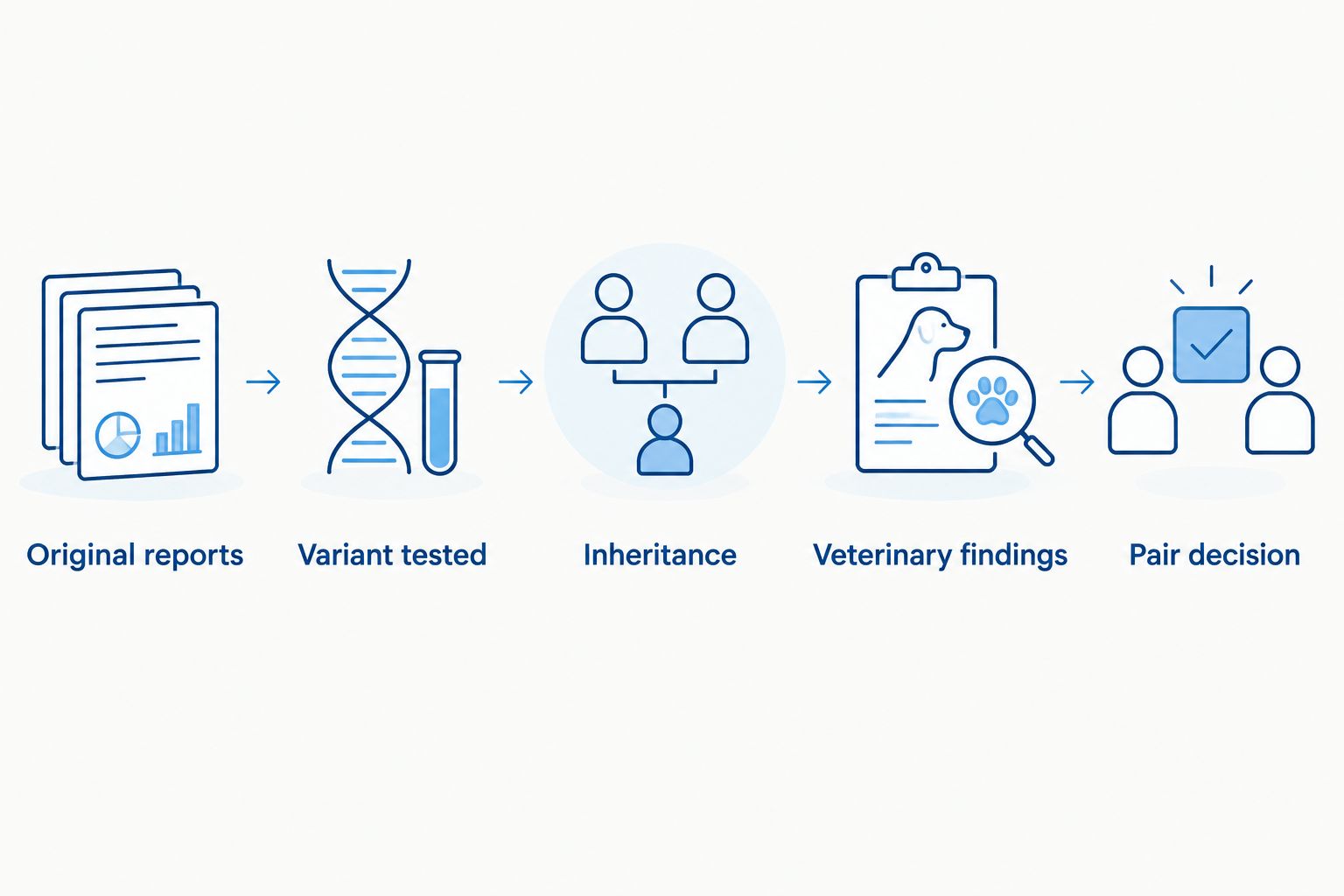
Instead of comparing bulldog DNA reports from memory, put both dogs’ results into one breeding-pair record, check each shared risk, and stop any match that needs veterinary review before discussing color or pedigree. This 2026 workflow connects DNA health clearance results to breeding pair selection without treating a clear panel as proof that either dog is healthy in every respect.
TL;DR
For dna health clearance results breeding pair selection, compare both dogs by named variant and inheritance pattern before approving a match.
Shrinkabulls’ breeding-pair workflow is best for bulldog breeders who put documented health results ahead of color goals.
A clear DNA result covers the variants tested; it does not replace an airway, eye, heart, or orthopedic evaluation.
Keep the original reports, confirm each dog’s identity, and record the reason for every breeding decision.
Why this matters
A DNA report describes particular variants, not the whole dog. The useful question is not whether both panels say clear; it is whether the same condition appears on both reports, what each result means, and what other health information the match still lacks. Start with the health testing panels to request from a bulldog breeder when deciding which records belong in your file.
This distinction matters especially with English and French Bulldogs. DNA testing cannot show you how comfortably a dog breathes, whether an eye examination found a problem, or what a veterinarian observed during an orthopedic evaluation. AKC registration establishes registration status; it is not a health clearance. In 2026, keep those categories separate in every breeding discussion, even when a dog has an appealing pedigree or rare coat color.
Shrinkabulls’ breeding-pair workflow is best for bulldog breeders who need a documented health decision before considering color. It gives you a practical way to organize a prospective match; it does not certify a dog, interpret an uncertain laboratory finding, or replace advice from your veterinarian or a veterinary geneticist.
Before you start
Get the original reports for both dogs, not screenshots of summary badges. You need the dog’s identifying information, laboratory, test date, variant or condition name, result, and the laboratory’s interpretation.
Gather each dog’s veterinary records and breed-relevant evaluations. Include findings about breathing, eyes, heart, joints, and reproductive health where available. Ask your veterinarian which evaluations apply to the specific dogs.
Check the easily missed mismatch: two panels can use different names or test different variants for a similarly named condition. Do not mark results compatible until you confirm that the reports address the same variant and inheritance pattern.
You also need permission to use the other owner’s records for a stud match. Keep the originals in a location both decision-makers can access, and agree who can edit the comparison. A forwarded summary is useful for starting a conversation, but the underlying report is what you need for the decision.
Set up your breeding-pair record
Use a spreadsheet or a shared document. These are column names you create, not buttons in a particular testing service. Give each prospective pair its own record so an updated result cannot silently change the reasoning behind an earlier decision.
Create columns labeled Dog, Breed, Identity, Laboratory, Report date, and Original report. Enter the name and identifying details exactly as they appear on each report; keep a copy of the original beside your working record.
Add Condition, Variant tested, Inheritance, Result, and Interpretation. Make a separate row for each result you intend to compare. Copy the variant name and result from the report rather than translating them into a general clear or positive label.
Add Veterinary findings, Questions for veterinarian, and Pair decision. Leave the decision open until you have compared both dogs and reviewed findings outside the DNA panel.
Compare the report identifiers with the records supplied for each dog. If an identifier differs, ask the report owner to resolve it before you use that result.
Expected result: you can trace every entry back to a named dog and an original report. If you cannot, the match is not ready for a genetics decision.
A simple file name can include the dogs’ names and the Report date, but do not make the file name your only record of identity. Reports get forwarded and renamed. The identifier inside the original document is the detail you need to reconcile.
Configure the variant comparison
The central step is a condition-by-condition comparison, not a side-by-side glance at two overall panel summaries. In 2026, a newer or broader panel still cannot answer a question about a variant it did not test.
Group entries by Condition, then confirm the exact Variant tested on each dog’s report. If only one dog has a result for that variant, mark the other result Not documented in your working record; do not substitute a result for another variant.
Read each report’s Inheritance and Interpretation before comparing clear, carrier, or affected labels. Those words have different breeding implications for different inheritance patterns.
For a condition described as autosomal recessive, identify whether each dog has 0 copies, 1 copy, or 2 copies of the tested disease-associated variant, if the laboratory reports copy count. Do not infer copy count when the report does not provide it.
Put any matching risk, uncertain result, or unexplained difference in Questions for veterinarian. Mark Pair decision as Review required, a label you create, until a qualified professional has assessed it.
Report situation
What it tells you
Breeding-pair action
Both dogs clear for the same recessive variant
Neither report identifies the tested variant in either dog
Continue the review; do not treat the pair as cleared for all conditions
One clear, one carrier for the same recessive variant
The reports show a different result for that tested variant
Ask a veterinary genetics professional to interpret offspring risk and breeding suitability
Both carriers for the same recessive variant
Both dogs carry the tested variant
Do not approve the pair on the strength of their panel summaries; obtain professional guidance
One result missing or variants differ
The reports do not establish a like-for-like comparison
Request the relevant result or clarification from the laboratory
Dominant, X-linked, complex, or uncertain finding
The recessive comparison above does not apply
Follow the report’s interpretation and seek case-specific advice
Expected result: every shared finding has a documented comparison, and every gap remains visible. Never turn Not documented into clear just to finish the sheet.
A pair decision comes after variant comparison and veterinary findings, not after a panel summary.
The table is a sorting aid, not permission to breed a particular carrier. For a fully penetrant autosomal recessive condition, inheritance follows a different pattern from a dominant or complex condition. The named variant, the report’s interpretation, the dogs’ clinical findings, and advice from a qualified professional determine the next step.
Add the clinical health review
DNA and clinical evaluations answer different questions. Put the actual examination findings beside the genetic results so the match cannot look complete simply because both dogs have panel reports.
Record the date and outcome of each available evaluation under Veterinary findings. Keep the clinician’s report, not just a verbal description that the dog passed.
Note any breathing difficulty, exercise intolerance, eye concern, orthopedic finding, or other issue documented by the treating veterinarian. Ask that veterinarian what the finding means for the dog and for a proposed match.
Record unresolved issues in Questions for veterinarian. Do not replace a missing examination with an unremarkable DNA panel.
Make the Pair decision explicit: Do not pair, Review required, or Proceed after review. These are your record labels, not laboratory classifications. Write the reason next to the label and identify which reports support it.
Expected result: another breeder or veterinarian can read the file and see both the genetic comparison and the clinical reasons for the decision. If the explanation only mentions coat color, the health review is incomplete.
For a bulldog stud match, share the relevant original reports and veterinary findings before selecting the stud. The stud-match consultation planning guide gives you a separate framework for preparing that discussion. Shrinkabulls offers stud services, but this article does not establish the test results or breeding suitability of any particular dog; request records for the individual match.
Add color results without letting them lead
Color genetics belongs in the same file, under a separate heading. A color result can describe a planned trait; it cannot cancel a health finding. That separation matters when comparing merle, lilac, or blue bulldogs in 2026.
Create Color genotype and Color goal fields only after the health and clinical review is recorded. Copy any genotype from the original color report rather than relying on appearance alone.
For any proposed merle pairing, identify each dog’s documented merle result and ask a qualified genetics professional to review the match. Do not plan a merle-to-merle pairing based on appearance or a verbal claim that one dog does not carry merle. Double-merle dogs face increased risks of hearing and vision problems.
Keep Color goal out of the Pair decision rationale until all health questions have a documented answer. If the health findings rule out the match, change the match rather than trying to justify it through color.
Expected result: the record shows whether a color goal is compatible with an otherwise acceptable match, not whether color persuaded you to overlook a risk. That is the order we recommend at Shrinkabulls for anyone using this 2026 checklist.
Recheck the match when a result changes
The second useful workflow starts when a dog receives a new report, a laboratory revises an interpretation, or a veterinarian documents a new finding. Do not edit an older result until the original decision disappears; keep a record of what changed.
Add the new document with its Report date and identify which earlier entry it updates. Retain the previous report so you can reconstruct the decision made from it.
Recompare the affected Variant tested, Inheritance, and Interpretation for both dogs. A change to one dog’s file affects every proposed pair involving that dog.
Update Questions for veterinarian and set Pair decision back to Review required while the new information is assessed.
Record the revised decision and its supporting reports. Tell the other owner what changed before treating the match as settled.
Expected result: a 2026 decision reflects the reports and examinations available when you made it, with a visible trail when new evidence changes the answer. Shrinkabulls’ breeding-pair workflow works best as a living record, not a one-time checkbox.
Troubleshooting
The panels list the same condition but different variants. Compare the exact variant names and ask the laboratories or a veterinary genetics professional whether the results address the same question. Until then, mark the comparison incomplete.
A dog is called clear, but the original report is unavailable. Request the report tied to that dog’s identity. A message, listing, or screenshot of an overall badge does not show what the panel tested.
A carrier result is being treated as a diagnosis. Read the report’s inheritance information and discuss the individual dog with a veterinarian. Carrier status for a recessive variant is not the same finding as an affected result.
The color report and health report appear to identify different dogs. Resolve the identity mismatch with the owners and laboratories before using either result for pair selection.
Both DNA panels look favorable, but a clinical concern remains. Keep Pair decision at Review required and obtain a veterinary assessment. A panel cannot clear an airway, eye, or joint finding it does not measure.
Customize your workflow
Once the comparison works for one pair, use the same fields for other prospective matches. Keep a separate decision for each pair: a dog’s result stays the same, but the other dog’s results and clinical findings change the comparison. This also makes it easier to explain why one proposed match stopped while another continued.
For a multi-generation plan, preserve the original reports and the reason for each decision rather than copying only the outcome into a pedigree. A recorded no is useful information. It tells the next person which health question ruled out a pairing and prevents the same unresolved question from being treated as new. In 2026, the file should help you answer what was tested, what remained unknown, and who reviewed the decision.
If you are discussing a stud service with Shrinkabulls, bring both dogs’ original reports and your list of unanswered questions. Ask about the individual stud’s records rather than assuming that a breed, registration, or color description supplies the missing clearances.
Prepare for a stud discussion
Organize both dogs’ reports and the questions you need answered before considering a match.
How do I use DNA health clearance results for breeding pair selection?
Compare both dogs’ original reports by exact variant and inheritance pattern, then add clinical findings before deciding. An overall clear label is not a substitute for a matching, documented comparison.
Can two dogs with clear DNA panels be paired?
Clear panels alone do not establish that a pair is suitable. Confirm what each panel tested and review both dogs’ clinical health with a veterinarian.
Can a carrier bulldog be used in a breeding pair?
Carrier status needs interpretation for the named variant and its inheritance pattern. Ask a veterinary genetics professional to assess the proposed pair rather than applying a blanket rule to every result.
What if the dogs were tested by different laboratories?
Compare the exact variants and the laboratories’ interpretations, not just the condition headings. If you cannot establish a like-for-like comparison, ask the laboratories or a qualified professional for clarification.
Does AKC registration count as a DNA health clearance?
No. Registration status does not show which disease-associated variants were tested or what a veterinarian found on examination.
Should coat-color DNA results go in the same breeding file?
Yes, but keep color results separate from health findings and review health first. Document each dog’s merle result before considering a proposed merle pairing.
What should I do when a new result arrives after choosing a pair?
Reopen the pair decision and compare the new result against the other dog’s report. Preserve the earlier record, then document the revised assessment before treating the match as settled.
One last thing
The most revealing entry in a breeding file is often Not documented. It does not mean a dog has a condition, and it does not mean the dog is clear; it tells you exactly which question to answer before pairing. For 2026 breeding-pair selection, protect that distinction as carefully as you protect the original reports.
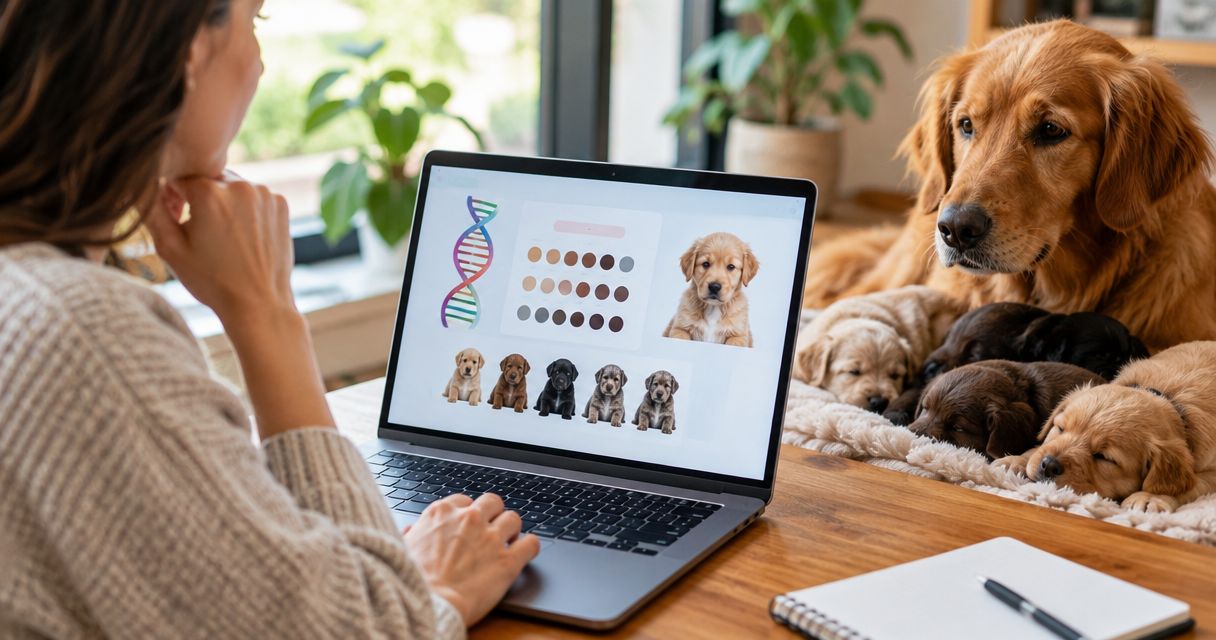
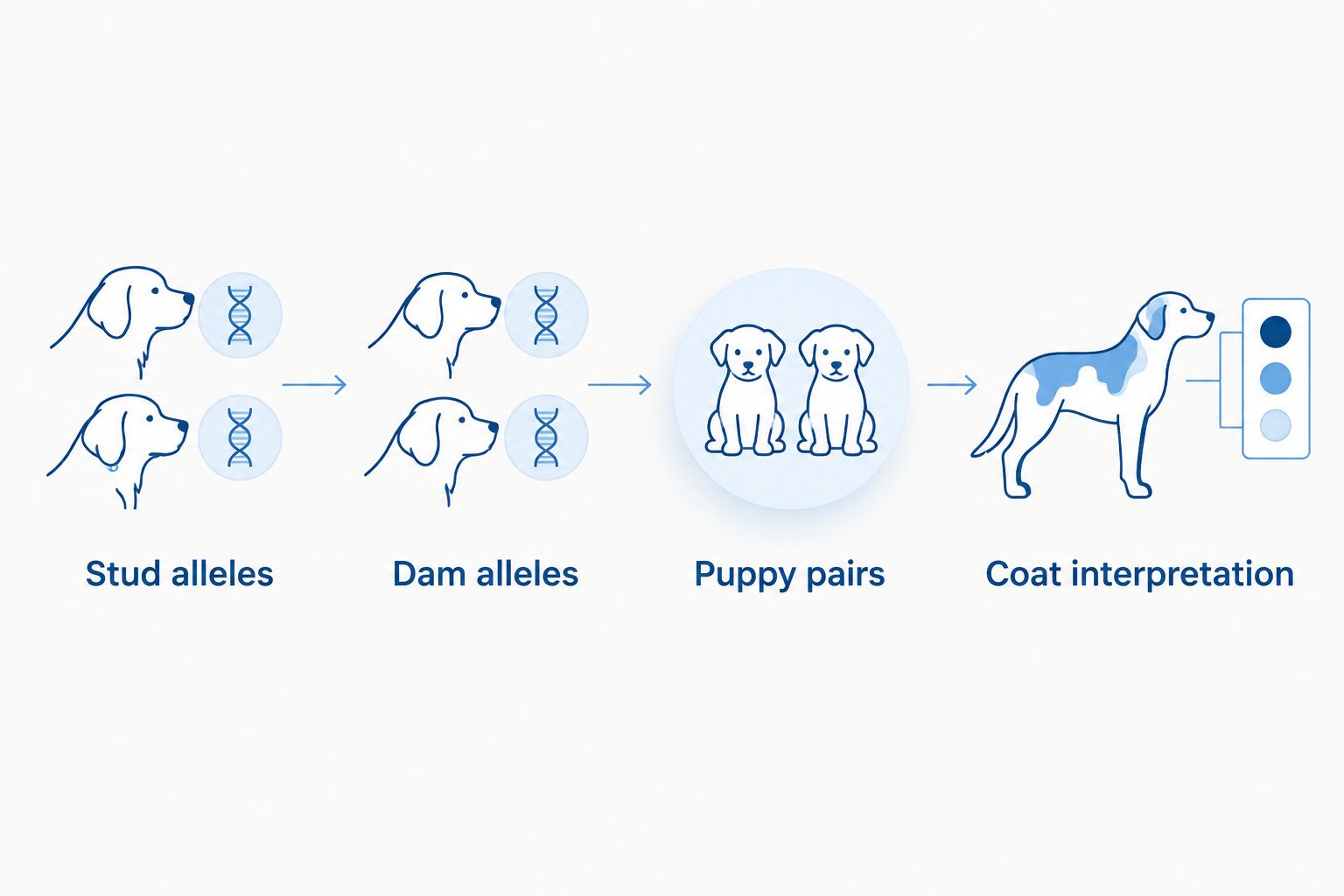
Instead of reading a stud’s DNA report and guessing what his puppies will look like, pair his results with the dam’s report and calculate each possible allele combination. A dna color genetics report litter color prediction gives probabilities for each puppy, not a promise about the litter as a whole.
TL;DR
A dna color genetics report litter color prediction needs tested results from both the stud and dam.
Shrinkabulls stud services are best for bulldog breeders who verify both parents’ reports before discussing a color match.
For D/d × d/d, each puppy has a 50% chance of inheriting d/d; litter outcomes can still vary.
Check merle findings and health results separately before choosing a breeding pair.
Why this matters
A stud can carry a color variant without showing it. His report tells you what he can pass on; it does not tell you what the dam carries or how many puppies will inherit a particular combination. If you’re choosing tests before making a match, start with the DNA color genetics test kits for rare-color bulldog breeding guide.
Shrinkabulls stud services are best for bulldog breeders who verify both parents’ reports before discussing a color match. The advantage of a report-based discussion is that you can identify possible outcomes before breeding. The limit is just as important: no report guarantees the color of an individual puppy, and color results do not replace a health assessment.
In 2026, keep the prediction tied to the exact dogs and reports in front of you. A description such as blue carrier or merle does not give you the same information as named genetic results for both parents.
Before you start
Get both parents’ color reports. Confirm each report identifies the dog, the testing laboratory, the tested loci, and the result at each locus you plan to model. The stud’s report alone cannot produce a two-parent prediction.
Have a place to record allele pairs. Paper works. A spreadsheet works too, provided you label your own columns Locus, Stud genotype, Dam genotype, Possible puppy genotypes, and Probability per puppy. These are worksheet labels to create, not buttons in a testing laboratory’s interface.
Check the non-obvious mismatch before calculating. A result marked not tested is not a negative result. For chocolate and merle especially, check which variants each laboratory actually assessed; reports with different coverage are not automatically interchangeable. Ask the laboratory or a veterinary genetics professional to clarify an unfamiliar designation.
Set up your parent results
Match each report to the dog. Record the stud’s and dam’s identifiers beside their results. Do not use a relative’s report as a substitute, even if the dogs look alike.
Copy results exactly. Enter each laboratory’s wording and genotype at the relevant locus. Keep a separate note for anything reported as inconclusive or not tested. Do not convert a color description into an allele pair.
Line up matching loci. Put the stud’s D-locus result beside the dam’s D-locus result, for example. Repeat for other loci covered by both reports. If one report does not cover a variant you need, stop that part of the prediction until it is clarified.
Mark what you do not know. Leave the possible-puppy cell unresolved where testing is missing. A blank is more useful than a confident-looking guess.
Expected result: You have a side-by-side record of both parents’ tested results, with missing or incompatible findings visible before any probabilities appear. For a 2026 breeding decision, save the original reports with this worksheet so you can check every entry against its source.
Calculate each puppy’s allele pairs
Start with one locus. At a typical autosomal color locus, a puppy receives one allele from each parent. Write down each allele the stud can pass on and each allele the dam can pass on.
Combine every possible contribution. If the stud is D/d and the dam is d/d, the stud can contribute D or d while the dam contributes d. The possible puppy pairs are D/d and d/d.
Assign probability per puppy. Under this simple single-locus model, D/d × d/d gives a 50% probability per puppy of D/d and a 50% probability per puppy of d/d. The D-locus d/d result is associated with diluted eumelanin pigment. It does not, by itself, name the puppy’s full coat pattern.
Repeat for each relevant locus. Model the loci separately first. Then consider how their results interact before describing a visible color. A puppy’s appearance depends on more than one entry on the worksheet.
Expected result: You can trace every predicted genotype to one allele from the stud and one from the dam. The percentages describe each puppy’s chance under the stated parental genotypes; they do not set a litter quota.
A small grid makes the pairing easier to check. The same method works on paper, so you do not need a particular app or laboratory dashboard to complete it.
Build the puppy genotype first; interpret the visible color after checking the other loci.
Translate genotypes into color possibilities
Separate a genetic result from a color name. Write D/d or d/d in the genotype column. Put any coat interpretation in a different column, with the other loci needed to support it.
Check whether the variant is the same in both parents. For example, if both dogs are B/b for the same relevant recessive variant, their possible offspring include B/B, B/b, and b/b. Under that simplified pairing, b/b has a 25% probability per puppy. If the reports use different variant labels, do not assume they mean the same allele.
Account for genes that change what you can see. The E locus affects whether eumelanin appears in the coat. That means a B- or D-locus result cannot always be translated directly into a visible chocolate or blue coat without the rest of the relevant findings.
Write the prediction as a condition. Use wording such as: if these reported genotypes are correct and the relevant variants are covered, these puppy genotypes are possible. Avoid a single color label when the test results support several appearances.
Expected result: Your 2026 litter color prediction lists possible genotypes, their per-puppy probabilities where the model supports them, and the findings needed to interpret visible color. It does not label untested variants as absent.
Approach
Best for
What it gives you
What it misses
Single-locus pairing
Checking what each parent can pass on at one tested locus
A traceable probability for possible allele pairs
Interactions that affect the visible coat
Combined-locus interpretation
Describing possible colors after the relevant loci are checked
A more useful picture of possible appearances
Any variant the reports did not assess
Use single-locus pairing to check your arithmetic. Use combined-locus interpretation before discussing puppy colors with anyone else. Neither approach substitutes for examining the dogs’ health, structure, and suitability as a pair.
Add a merle-specific check
Merle needs its own review rather than a quick entry in a color grid. Laboratories can distinguish merle allele types and lengths differently, and a visually subtle dog can still have a report finding that matters to a proposed pairing. Ask the laboratory how its stated result should be interpreted if the designation is unfamiliar.
Read both dogs’ reported merle results in full. Do not reduce a detailed result to merle or non-merle based on appearance alone.
Identify any unresolved result. If either parent’s merle status is unclear, pause the merle prediction and seek clarification before considering the match.
Review the pairing for health risk. Breeding two dogs that pass on merle variants can produce puppies with two merle alleles, which are associated with elevated risks of hearing and eye abnormalities. A color goal does not justify ignoring that risk.
Keep merle conclusions separate. Record what the reports support, what remains unknown, and whether professional review is needed. Do not apply the simple D-locus example to a complex merle report.
Expected result: Your merle note makes the proposed pairing’s reported findings and unresolved questions visible. Shrinkabulls offers bulldog stud services, but a desired pattern should not outrank a responsible review of both dogs.
Recalculate when the dam changes
Keep the stud’s verified results and replace the dam’s column when evaluating a different potential match. Then rebuild every allele pairing from the start. A stud does not have one fixed litter color prediction: a different dam can change both the possible genotypes and their probabilities.
For example, compare the earlier D/d × d/d pairing with D/d × D/D. Under the same simplified model, the second pairing has a 0% probability per puppy of d/d because the D/D dam passes D to every puppy. That change comes from the dam’s genotype, not a change in the stud’s report.
In 2026, label each worksheet with the exact stud and dam it covers. Do not carry probabilities from one proposed pairing into another, and do not combine results from different reports without checking their variant coverage again.
Troubleshooting
The stud is called a carrier, but no genotype is shown. Ask for the underlying laboratory result. Carrier describes a finding; it does not identify every variant assessed or supply the dam’s result.
One parent looks blue, but the worksheet disagrees. Check the dog’s identity and the D-locus entry on both reports. Then review the other relevant loci and ask the laboratory to resolve any discrepancy rather than changing the genotype to fit a photograph.
The reports use different chocolate labels. Find each laboratory’s variant definition and coverage. Do not merge two labels into B/b × B/b until you know they describe the alleles in your calculation.
The merle result has an unfamiliar suffix or designation. Keep that result verbatim and request interpretation from the testing laboratory or a veterinary genetics professional. A plain-language coat name can discard information the pairing needs.
The litter does not match the predicted percentages. Per-puppy probability is not a guaranteed count. Recheck parent identification and test coverage if a puppy’s result appears impossible under the documented genotypes.
Customize your workflow
Add separate columns for Color result, Health result, and Question to resolve. This keeps a striking coat possibility from being mistaken for evidence that a breeding match is sound. Record which findings came from laboratory testing and which still need discussion with your veterinarian.
If you’re comparing proposed matches across generations, use the same parent-by-parent worksheet and read the multi-generation breeding program for rare colors guide next. For a specific Shrinkabulls stud-service discussion, bring both reports and the questions you marked unresolved. That is more useful than arriving with a puppy color you expect the stud to produce.
Discuss a bulldog stud match
Bring both parents’ color reports and your unresolved genotype questions.
Can a stud’s DNA report predict a whole litter’s colors?
No. A stud’s report identifies tested variants he can pass on, but a litter color prediction also needs the dam’s results. Even with both reports, probabilities apply to each puppy rather than guaranteeing a litter breakdown.
What does D/d × d/d mean for bulldog puppies?
Under a simple D-locus model, each puppy has a 50% chance of D/d and a 50% chance of d/d. Other loci still matter when interpreting the puppy’s visible coat.
Does a 25% probability mean one puppy in four will have that color?
No. A 25% probability describes each puppy’s chance under the stated genetic model, not a required count in a litter. The actual litter can differ from the expected proportion.
Can two different DNA laboratories’ color reports be combined?
Yes, if you first confirm that their locus names, variant definitions, and test coverage match for the results you are comparing. Treat any untested or unclear variant as unresolved rather than negative.
Can you predict merle puppies from a photo of the parents?
No. Use both parents’ merle test results and seek clarification of unfamiliar allele designations. Appearance alone does not provide the detail needed to assess a proposed merle pairing.
Does an AKC-registered bulldog have known color genotypes?
No. Registration and a DNA color-genetics report answer different questions. Use the individual dog’s laboratory results for a genetic pairing calculation.
Should color genetics be the deciding factor in a stud match?
No. Color predictions do not assess every health concern or determine whether two dogs are suitable to breed. Review health findings and the proposed pairing separately from the color worksheet.
One last thing
The most useful entry on a 2026 prediction worksheet is often unresolved. It tells you exactly which result to verify before turning a possible bulldog color into a claim about future puppies. We love talking bulldogs, but a careful match starts with both dogs’ actual reports.
Instead of watching a whelping camera feed every minute, set up phone alerts that prompt you to check your bulldog in person when the camera detects activity. Use alerts as a backup to direct observation and your veterinarian’s delivery plan, never as a way to diagnose labor from another room.
TL;DR
Shrinkabulls’ whelping camera phone alerts labor monitoring guide is best for bulldog breeders who need a prompt to check in person.
Choose a camera with app alerts, then enable both camera alerts and phone notifications.
Test from another room with the phone locked; a working live feed does not prove alerts work.
Motion can signal activity, but it cannot confirm labor or replace your veterinarian’s delivery plan.
Why this matters
A live video feed shows what is happening when you open it. A phone alert has a different job: draw your attention to the whelping area while you are doing something else. In 2026, that distinction matters more than a long list of camera features. If an alert never reaches your locked phone, the camera is only a feed you have to remember to check.
For English and French Bulldogs, agree on a delivery plan with a veterinarian before relying on any monitoring setup. A camera cannot assess the dam’s condition, tell normal movement from an emergency, or decide whether veterinary help is needed. The guide to why English Bulldogs need C-sections covers the breed-specific delivery question; use your own veterinarian’s instructions for the dam you are monitoring.
Shrinkabulls’ whelping camera guide is best for bulldog breeders who want an alert to trigger a live check, not an alert to make a medical decision. That is the rule behind every setting below.
Before you start
Have the camera, its companion app, and account access ready. Check that the camera you own supports push notifications. If you are still choosing one, compare the alert features in this guide to whelping monitoring cameras for bulldog breeders. Do not assume a camera with live viewing also sends alerts.
Put the phone and camera on working connections. Complete the camera’s normal network setup first, and keep the phone able to receive notifications. Have a second adult’s phone available if that person will share monitoring duties.
Set the veterinary plan before changing alert sensitivity. Know whom to call and follow the veterinarian’s instructions if you are concerned about the dam. The easily missed setup problem is that notifications can be enabled in the camera app but blocked by the phone’s notification settings or a silence mode.
The menu names inside camera apps vary by manufacturer. Use the names in your camera’s own instructions rather than treating a sample label as a universal button. The phone settings below name iPhone controls; Android menus vary by device.
Position the camera
Place the camera where its view includes the dam’s usual resting area and the part of the whelping box you need to observe. Keep the device and its cord out of the dogs’ reach. A close view is useful only if you can still see changes in position and activity.
Open the live view in the camera’s companion app. Check the image with the room lighting you expect to use. Look for glare, a blocked corner, or bedding that hides the area you meant to watch.
Move the camera if the dam can disappear from view while remaining in the box. Then recheck the image before configuring alerts. If you need to settle the box layout first, use this bulldog whelping box guide.
Expected result: You can open the feed and see the area you intend to monitor. That confirms the view, not the alert delivery.
Check the camera’s view before you rely on its alerts.
Configure motion alerts
Find the camera’s notification settings in its companion app. The exact menu label depends on the camera. Turn on push alerts for the camera aimed at the whelping area, then confirm that motion detection is enabled if the app treats detection and notifications as separate controls.
Set the detection area if your camera offers one. Include the dam’s resting area. Exclude a doorway or other visible movement outside the box when that movement produces irrelevant alerts. Do not narrow the area so much that the dam can move within the box without detection.
Choose the sensitivity available in your app, then create a test by moving through the camera’s view. If bedding movement repeatedly triggers alerts, adjust the setting and test again. If your movement produces no alert, check both the detection area and sensitivity before assuming the phone is at fault.
Review any alert schedule. Some cameras let you restrict when notifications are sent. Make sure an active schedule does not silence the period you intend to monitor. Leave the schedule unrestricted if that is the clearest way to avoid a gap.
Expected result: An intentional movement in the monitored area creates an alert in the camera app. In 2026, test the behavior on your actual camera; menus and detection options differ.
Motion alerts and sound alerts serve different purposes. Use this comparison before adding another notification type:
Alert type
Best for
Advantage
Limitation
Motion
Prompting a check when visible activity changes
Directs you back to the camera view
Bedding, people, and routine repositioning can also trigger it
Sound, if supported
Prompting a check when the camera detects noise
Can draw attention when movement is outside the selected area
Household noise can trigger it; silence does not rule out a problem
Neither option identifies labor. Treat an alert as a request to look, not a report of what is happening.
Enable phone delivery
Allow notifications on the phone. On iPhone, open Settings, tap Notifications, select the camera app, and turn on Allow Notifications. On Android, open Settings, then Notifications and the camera app’s notification controls; the route differs by device. Allow the app’s alerts rather than relying on the live feed alone.
Check silence settings. Review Focus on iPhone or Do Not Disturb on Android, along with any app-specific notification categories. Set them to permit the alerts you intend to receive. Also check that the phone is not muted in a way that defeats the audible warning you expect.
Lock the phone and leave the camera view. Have another adult move through the detection area while you wait elsewhere. Confirm that the alert appears on the locked screen and can be opened to the live view. Repeat the test on any second phone that will share the job.
Test the connection you will actually use. A test beside the camera does not check what happens when the phone is away from the home network. Use a working connection on the phone and repeat the locked-screen test from where you expect to receive alerts.
Expected result: Movement produces a visible notification on the locked phone, and tapping it lets you inspect the live view. If you need an audible alert, verify that you hear one rather than assuming it is enabled.
A working feed is only part of the setup; the locked-phone test checks the alert.
Add sound alerts when your camera supports them
Sound detection is a useful second variant of this workflow only if your camera offers it. Do not replace motion alerts without testing both. In 2026, the aim is to give the person monitoring the dam another reason to check the feed, not to infer what a particular sound means.
Find sound detection in the camera app’s detection settings, if available. Enable its notification option separately if the app separates detection from alert delivery.
Test ordinary room noise while watching which alerts reach the phone. If routine sounds cause too many notifications, adjust the available sensitivity or turn sound alerts off. Keep the motion test intact.
Ask the second monitor to repeat the test with their phone locked. Confirm that both adults know who will check the dam when an alert arrives; duplicate notifications do not assign responsibility.
Expected result: The phone alerts for the test sound when that feature is enabled, while motion alerts still work as configured. If your camera lacks sound detection, stay with tested motion alerts and direct checks. There is no reason to build a plan around a feature your device does not have.
Troubleshoot missed or constant alerts
The feed works, but the phone never alerts. Check that push alerts are enabled inside the camera app and allowed in the phone’s settings. Then repeat the locked-screen test. A working video stream does not confirm notification permission.
Alerts appear only while the app is open. Review the phone’s notification permission and any power-saving restrictions affecting the app. Close the live view and test again; the whole point is to receive a prompt while you are not watching.
The phone stays quiet during the test. Check Focus or Do Not Disturb, notification sound settings, and the camera’s alert schedule. Confirm a visual notification separately from an audible one so you know which part failed.
Every small movement triggers an alert. Recheck the detection area before lowering sensitivity. A doorway, person passing the box, or moving bedding can fill the phone with alerts unrelated to the dam.
The camera reports activity, but the useful area is out of view. Reposition the camera and retest. No alert setting fixes a blind spot. Make sure the device and cord remain out of reach after the move.
If an alert fails a repeat test, do not treat that phone as a reliable monitoring channel until it passes. Continue direct observation and follow the veterinary plan. Shrinkabulls’ bulldog breeding readers should make that decision before an active delivery, when there is time to fix the setup.
Customize your workflow
Write down a simple handoff: who checks the dam, who contacts the veterinarian, and who takes over when the first person steps away. Test each person’s phone rather than assuming a shared camera account gives both phones the same notification behavior. In 2026, a successful alert on one device says nothing about the other device’s settings.
Keep the response to an alert simple. Open the live view, then check the dam in person when activity or your veterinary instructions call for it. Do not wait for a motion alert before acting on a concern you notice directly. If a French Bulldog dam has a planned surgical delivery, prepare around the veterinarian’s schedule and instructions; this guide to preparing a French Bulldog dam for a scheduled C-section covers that separate task.
For Shrinkabulls’ bulldog breeding audience, the best setup is the one both monitors can demonstrate with their own locked phones. Camera features you have not tested are not part of the plan. Recheck the view and alert delivery after moving the box, changing phones, or changing network settings.
FAQ
Can a whelping camera tell me when my bulldog is in labor?
No. A camera shows video and, if configured, alerts you to detected activity; it cannot diagnose labor. Check the dam directly and follow your veterinarian’s delivery instructions.
How do I get whelping camera alerts on my phone?
Enable detection and push alerts in the camera app, then allow notifications for that app on the phone. Lock the phone and trigger a test alert to confirm delivery.
Why does my camera show video but send no alerts?
Live viewing and alert delivery use different settings. Check the camera’s detection and push-alert controls, the phone’s notification permissions, and any silence schedule.
Should I use motion or sound alerts for labor monitoring?
Start with tested motion alerts and add sound alerts only if your camera supports them. Neither type confirms labor, and both can react to activity unrelated to delivery.
Can two people receive alerts from one whelping camera?
That depends on the camera’s account-sharing and notification options. If you set up two phones, test each locked phone separately and agree who will check the dam.
Will Do Not Disturb block my whelping camera alerts?
It can silence or limit alerts, depending on your phone settings. Review Focus or Do Not Disturb, then test for both a visible notification and the sound you expect.
Is a phone alert enough to monitor a bulldog delivery?
No. Phone alerts are prompts to check, not a substitute for direct observation or veterinary guidance. Have a delivery plan before relying on the camera.
One last thing
Test the alert with the screen locked, not while you are watching the feed. That single change exposes the failure this setup is meant to prevent: a camera that displays video perfectly but never gets your attention. In 2026, keep the camera, the phone, and the veterinary plan doing their separate jobs.
Instead of manually piecing together insurance dates and vet records after your puppy’s first appointment, apply before the visit, confirm when coverage starts, and keep the exam notes ready for the insurer. For the appointment itself, use this first vet visit preparation guide alongside your insurance paperwork.
TL;DR
For pet insurance enrollment first vet visit timing, apply before the appointment and verify the policy’s effective date.
Shrinkabulls recommends this sequence for new bulldog owners, but enrollment alone does not mean a visit is covered.
Tell the vet about every concern, then keep the dated exam record for future insurance questions.
Do not delay care to change an insurance timeline; a policy cannot erase a pre-existing finding.
Why this matters
Your puppy’s first vet visit creates a dated medical record. An insurer also uses dates: when you applied, when the policy took effect, when any waiting period ended, and when signs of a condition first appeared. Those dates must be checked separately. An application confirmation is not proof that every condition is covered at the appointment.
For a new English or French Bulldog owner in 2026, the practical goal is a clear sequence, not a race to beat the exam. Apply when you have the puppy details, read the actual policy terms, and give the vet a complete history. If your puppy needs care before coverage starts, get the care. Insurance paperwork never outranks a puppy’s breathing, comfort, or safety.
Shrinkabulls is best for prospective English and French Bulldog owners who want breeder context alongside a straightforward first-visit checklist; an insurer, not Shrinkabulls, decides coverage.
Before you start
Have the puppy’s records together. Use the date of birth, breed, identification details you have, and any vaccination, deworming, treatment, or examination records supplied with the puppy. Do not fill gaps by guessing; ask for the missing record.
Have access to both appointments and accounts. You need a way to submit the insurance application, receive policy documents, and book or confirm the vet visit. Save the email address used for enrollment so you can find later notices.
Check the timing trap before you book around coverage. A policy can distinguish its effective date from waiting periods for particular conditions. Read both, along with its definition of pre-existing conditions, before treating the first appointment as a covered visit.
Set your insurance dates
Collect records. Put the puppy’s existing health documents in one folder. Note the date and source of any observation you plan to raise with the vet, including breathing, eyes, skin, movement, or digestion. A symptom observed before enrollment does not become new because the vet documents it later.
Complete the application accurately. Enter the puppy’s details as requested and answer health-history questions using what you know. If the form asks about symptoms rather than diagnoses, do not leave out an observed symptom simply because no vet has named it.
Save the confirmation and policy. Keep the application submission notice, policy documents, and any later coverage notices. The confirmation shows that an application was submitted; the policy and insurer’s confirmation establish the dates and terms you need to check.
Confirm dates in writing. Identify the policy’s effective date and any applicable waiting periods. If a date or condition is unclear, ask the insurer to explain it in writing before you rely on an assumption.
Expected result: You have a dated application record and a written answer about when the relevant coverage starts. For your 2026 records, save the insurer’s actual wording rather than a date copied from an advertisement.
Configure the first vet visit
Book the appointment based on your puppy’s care needs. Tell the clinic this is a new puppy’s first visit with you and provide the records you have. Do not move a needed examination just to reach an insurance date.
Prepare a factual history. List observations, their first known dates, previous treatment, and questions for the vet. A short list is easier to discuss than trying to remember symptoms in the exam room.
Ask what records the clinic can provide. After the visit, you need the dated examination notes, diagnoses if any, and records of tests or treatment. Ask the clinic how to request copies; do not assume a visit summary contains the full medical record.
Bring the policy questions with you. The vet can explain medical findings, but the insurer decides how policy terms apply. Keep those questions separate so you do not mistake a medical opinion for a coverage decision.
Expected result: The clinic has the available history, and you know how to obtain the dated notes. In 2026, an accurate first record helps you track your puppy’s health even if you never submit a claim.
Share the exam record
Review the notes for accuracy. Check your puppy’s identifying details and whether the history you gave the vet is recorded correctly. If something is wrong, ask the clinic how to request a correction; do not alter the record yourself.
Keep copies together. Save 2 document copies in places you can access: one with your puppy’s health records and one with your insurance correspondence. Include the policy version, enrollment confirmation, and any written insurer responses.
Follow the insurer’s instructions. If the insurer requests a first-exam record or medical history, send what it asks for through its stated process. Keep proof of submission and note which documents were included.
Check any coverage response against the policy. If an insurer identifies an exclusion or asks for more history, read its explanation against the effective date, waiting periods, and recorded symptom dates. Ask for clarification in writing when those do not line up.
Expected result: Your medical and insurance timelines can be read side by side. The workflow does not guarantee a claim decision; it prevents lost documents and unclear dates from making that decision harder to understand.
Keep the insurer’s dates and the vet’s dated notes in the same record set.
If the visit comes before enrollment
Sometimes the appointment cannot wait. Take the puppy to the vet first, then apply with the full, accurate history. Applying afterward does not make an earlier visit covered, and an earlier finding can affect how an insurer applies its pre-existing-condition terms. What you can control is the quality of the records and the accuracy of the application.
Sequence
Best for
Advantage
Limitation
Enroll, then attend the first visit
A puppy whose needed appointment can proceed on schedule after you have applied
You can review policy dates before the exam
Enrollment does not guarantee the visit or a later condition is covered
Attend the first visit, then enroll
A puppy who needs care before you can finish enrollment
Care is not delayed for paperwork
Earlier findings must be disclosed and can affect future coverage
If the vet identifies a concern, ask for the clinical notes and any recommended follow-up. When you apply, answer the insurer’s health questions using that record. For a bulldog puppy with breathing concerns, the pet insurance coverage guide for English Bulldog breathing surgery gives you condition-specific questions to take to insurers; it is not a substitute for the terms of the policy you choose.
Troubleshoot the handoff
The appointment is soon, but you cannot confirm coverage
Keep the appointment if your puppy needs it. Contact the insurer for its effective date and applicable waiting periods in writing. Do not treat an application receipt as a coverage decision. If the insurer has not answered, plan the visit without assuming reimbursement.
The application asks for a diagnosis you do not have
Answer the question that is actually asked. If it requests diagnoses, do not invent one; if it requests signs or symptoms, disclose what you have observed. Ask the insurer how to record an undiagnosed concern when its form does not make that distinction clear.
The vet record omits a concern you raised
Ask the clinic how to add an accurate note to the record. Give the date you first noticed the concern and what you told the vet. Keep the original record and the clinic’s correction together rather than editing a copy yourself.
The insurer asks for records you have not received
Request the records from the clinic and ask the insurer which documents it needs. Save both requests. A dated visit summary and full clinical notes are not necessarily the same document, so confirm which one satisfies the request.
The policy dates conflict with an email
Ask the insurer to reconcile them in writing. Include the policy identifier and the specific dates you are comparing, but send documents only through a channel the insurer accepts. Keep its answer with the policy version that applied at enrollment.
Customize your workflow
Your record folder can do more than support insurance questions. Add future vaccination records, medication instructions, follow-up notes, and any written explanation of exclusions. Keep each item dated so a later vet can see what happened and when.
For English and French Bulldogs, make a separate question list for breathing, eyes, skin folds, and movement when those topics are relevant to your puppy. That list helps you describe what you actually see; it is not a diagnosis. If the puppy is uncomfortable or struggling to breathe, contact a vet promptly rather than waiting for an insurer to answer.
A useful 2026 routine is to check the folder within 24 hours of a visit: save the new record, read the vet’s instructions, and note any question that still needs an answer. This is an organization step, not an insurance deadline. Shrinkabulls recommends keeping the care decision and the coverage decision separate: the vet addresses the puppy’s health, while the insurer interprets the policy.
FAQ
Should I enroll in pet insurance before my puppy’s first vet visit?
Apply before the first visit when you can do so without delaying needed care. Check the policy’s effective date and waiting periods; applying first does not guarantee that the appointment is covered.
Does a first vet visit have to happen after coverage starts?
No. Schedule the visit according to your puppy’s care needs. If it happens before coverage starts, keep the dated record and disclose relevant findings when applying.
Will insurance cover something the vet finds at the first appointment?
The insurer decides under the specific policy terms and the condition’s documented history. An enrollment confirmation alone cannot establish whether that finding is covered.
What if I noticed a symptom before enrolling but the vet has not diagnosed it?
Disclose the symptom when the insurer asks about signs or health history. Record when you first noticed it and ask the insurer how its pre-existing-condition terms apply.
What records should I keep after the first vet visit?
Keep the dated exam notes, any diagnoses and treatment records, your enrollment confirmation, the policy, and written insurer responses. Ask the clinic for full notes if the visit summary is incomplete.
Can I wait for a policy waiting period to end before seeing the vet?
Do not delay needed veterinary care to reach a coverage date. Ask the vet about the puppy’s immediate needs and the insurer about policy timing as separate questions.
Who can confirm whether my puppy’s visit is covered?
The insurer can explain coverage under your policy. Your vet can document medical findings and recommend care, but cannot promise how an insurer will decide a claim.
One last thing
The most useful date is not always the appointment date. It can be the date you first noticed a symptom, which is why your notes should be honest even when the puppy seems fine by the time the vet sees them. In 2026, start that simple record before the visit and keep adding to it afterward. We want your bulldog’s care to lead the schedule, not an insurance form.
Instead of matching puppy paperwork to microchip records by hand on pickup day, build one record for each puppy as you complete AKC litter registration and microchip enrollment. The two records are separate: AKC registration documents a dog's pedigree, while microchip enrollment connects its chip number to contact information for a lost-pet search.
TL;DR
AKC litter registration microchip enrollment is not one combined step; keep the AKC and chip records separate.
Shrinkabulls’ bulldog paperwork workflow is best for breeders handing each puppy’s records to a new owner.
Match each puppy’s microchip number to its individual registration paperwork before handoff.
Ask the new owner to confirm that the microchip registry has their current contact information.
Why this matters
A puppy can have AKC registration paperwork and still have a microchip record with outdated contact details. A puppy can also have an enrolled microchip without being individually registered with the AKC. Neither record proves that the other is complete.
For a bulldog breeder, the risk is a handoff error: the right puppy leaves with the wrong chip number, or the new family assumes that receiving AKC papers updated the microchip registry. If you are choosing identification for a puppy before handoff, start with microchip and ID tag options for a new bulldog puppy. Then use the workflow below to keep the records aligned.
Shrinkabulls' AKC litter registration microchip enrollment workflow is best for bulldog breeders who need a clear record for each puppy and its new family. Its strength is a puppy-by-puppy check; its limit is that the breeder still has to verify the registration and microchip records separately.
Before you start
Gather the litter details and AKC paperwork. You need the sire and dam information, the litter's birth details, and access to the breeder's AKC registration process. Check that the parent and litter details match your existing records before submitting anything.
Get a verified chip number for each puppy. Have the veterinarian or trained implanter scan the implanted chip and give you its number. Do not rely only on the number printed on an unused chip package: the record must identify the chip actually in that puppy.
Know which contact details belong in the chip registry. Use the enrollment provider's instructions for the breeder-to-owner handoff. The gotcha is timing: entering the breeder's details does not make the new owner's details appear later without an update or transfer through the registry.
Keep the chip number in a per-puppy worksheet, alongside a physical identifier you can check at each appointment and handoff. That worksheet is your matching tool, not a substitute for either official record.
Set up the AKC litter record
Confirm the sire and dam. Compare their AKC identifying details with the breeding records before starting the litter application. A spelling or number error at this stage can carry into the documents you use for each puppy.
Enter the litter information. Follow the AKC's current litter-registration instructions and use the birth date and litter details recorded by the breeder. Review the completed application against your records before submitting it.
Save the litter confirmation. Keep the confirmation and any puppy registration applications with your litter file. Note which puppy receives each individual application; do not treat the litter confirmation as proof that every puppy has been individually registered.
Expected result: you have a litter record and can identify the registration paperwork intended for each puppy. You have not enrolled any microchips by completing this step.
In 2026, work from the current AKC application and the documents it generates rather than an old screenshot of a registration screen. The labels and submission route you see are the ones to follow; this guide does not assume a particular button or menu is present.
Match each chip to its puppy
Scan one puppy at a time. Have the implanted chip scanned and read back the entire number. Match that scan to the puppy in front of you before moving to a littermate.
Write the number into that puppy's record. Record the microchip number next to the puppy's physical identifier and the individual AKC paperwork assigned to it. Keep those documents together.
Check for a mix-up. Scan again if a digit is unclear, a number appears in two puppy records, or the paper label does not match the scan. Correct the worksheet before you submit enrollment information.
Expected result: each puppy has one checked chip number paired with its own registration paperwork. The scan confirms the implanted chip's number; it does not confirm who is listed as a contact in a registry.
A chip scan and an enrollment confirmation answer different questions.
Configure microchip enrollment
Identify the chip's enrollment provider. Use the paperwork supplied with the chip or ask the veterinarian or implanter which registry instructions apply. Do not assume AKC litter registration enrolled the chip, or that every chip uses the same registry.
Enter the scanned number. Follow that provider's current enrollment instructions and compare the number entered with the number in your per-puppy record. Check every digit before submitting.
Add contact information as instructed. Enter the appropriate contact details for the puppy's current stage of ownership. If the breeder is the initial contact, document what the new owner must do to update the registry after pickup.
Keep the confirmation. Save the enrollment confirmation or other proof the provider gives you. Compare its chip number with the puppy's scan and AKC paperwork.
Expected result: you can show which registry holds the puppy's microchip record and which number was enrolled. A submitted form alone is not a reason to assume the contact information is correct; inspect the provider's confirmation or account record.
The 2026 handoff file should make the division plain. AKC documents address registration and pedigree. The microchip record addresses identification and recovery contact details. If you choose AKC Reunite as the chip enrollment provider, follow AKC Reunite's enrollment instructions; AKC litter registration alone is not a replacement for that enrollment step.
Prepare the owner handoff
Rescan the puppy at handoff. Compare the live scan with the number in the registry confirmation and the puppy's worksheet. Stop and investigate any mismatch before handing over the documents.
Give the owner the correct records. Pair that puppy's AKC application or individual registration documents, if available, with its microchip number and enrollment instructions. Explain which steps the owner still needs to complete.
Ask for an owner-side check. Have the owner confirm their contact details through the chip registry's current process. Ask them to keep those details updated when their phone number or address changes.
Expected result: the owner can identify the puppy's chip number, locate the right registration papers, and find the registry process for checking their contact record. In 2026, put this check on the pickup checklist rather than leaving it as a verbal reminder.
For our bulldog families, the important distinction is simple: a stack of papers does not tell a shelter whom to call. The microchip registry needs reachable contact details tied to the number a scanner reads. That is why Shrinkabulls' handoff workflow treats the live scan as the final matching check, not as proof that the owner update happened.
When the owner registers the puppy after pickup
Some breeders provide an AKC individual registration application for the new owner to complete. In that version of the workflow, finish the chip match before pickup, then track AKC individual registration as an owner task. The breeder's litter registration, the owner's individual registration, and microchip enrollment remain distinct actions.
Give the owner the puppy's assigned AKC application. Check that it belongs to the puppy whose chip was scanned at handoff.
Give the owner the scanned chip number and registry instructions. Tell them how to check the contact information shown by the registry; completing AKC paperwork does not perform that check for them.
Ask the owner to confirm both completions. One confirmation concerns the individual AKC registration process. The other concerns the microchip registry's contact record. File them separately.
This variant matters in 2026 because the puppy can go home before the new owner finishes individual AKC registration. Do not hold the microchip contact update until the AKC paperwork is complete. The chip record needs an owner-side check as its own task.
Troubleshooting
The chip number on paper does not match the scan. Scan the puppy again and compare the complete number with the implanter's record. Do not change the AKC or registry file to match a handwritten number until you know which source is wrong.
Two puppies appear to have the same chip number in your worksheet. Rescan both puppies separately. A duplicated entry is a record problem until the scans establish the implanted numbers; do not assign documents from memory.
The chip scans, but you cannot find its enrollment confirmation. Check the chip paperwork and contact the stated enrollment provider or implanter for the correct lookup process. A successful scan proves the chip is readable, not that contact details are on file.
The registry shows the breeder after the puppy has gone home. Follow that registry's owner-update or transfer instructions and ask the new owner to verify the resulting record. AKC registration paperwork does not make this contact change for you.
The AKC paperwork and registry display different names. Check whether one record identifies the breeder and the other identifies the current owner. Correct each record through its own organization; do not assume changing one automatically changes the other.
Customize your workflow
Add a separate status for each action in your 2026 litter worksheet: litter application completed, individual puppy papers assigned, chip scanned, chip enrolled, and owner contact checked. A single completed checkbox for the whole litter hides puppy-level errors. Mark a status complete only when you have the document, scan, or confirmation that supports it.
Keep the worksheet usable without putting private owner details on papers that do not need them. The operational key is the puppy-to-chip match; the registry is where the contact details need to be current. For owners, write the next action plainly: check the registry record for the scanned chip and complete the individual AKC registration steps shown on their paperwork.
If a family asks whether registration papers guarantee that a chip can help reunite a lost puppy, answer no. The chip must be scannable, its number must be enrolled with a provider, and the contact record must lead to someone reachable. Shrinkabulls can make that handoff easier by keeping each bulldog puppy's paperwork together, while the new owner remains responsible for checking their current details.
FAQ
Does AKC litter registration automatically enroll a puppy’s microchip?
No. AKC litter registration and microchip enrollment are separate processes. Check the chip provider’s enrollment record and its contact details independently.
Is a registered litter the same as an individually registered puppy?
No. Registering a litter does not mean each puppy has completed individual AKC registration. Check the paperwork assigned to that puppy and the owner’s remaining steps.
How do I match a microchip to the right bulldog puppy?
Scan the puppy and compare the complete number with its individual worksheet and paperwork. Repeat the scan if any digit or puppy identity is uncertain.
Can AKC registration replace microchip enrollment?
No. AKC registration documents pedigree, while microchip enrollment connects a scanned chip number to recovery contact information. Complete and check each record separately.
What if the microchip registry still lists the breeder?
Use the registry’s current update or transfer process and have the new owner verify their contact record. Changing AKC paperwork does not confirm a registry contact update.
When should the new owner check the chip record?
The new owner should check it at handoff and after completing the registry’s owner-update process. They should check it again whenever their contact details change.
Does a readable microchip prove that its contact details are current?
No. A scan reveals the chip number, not whether the registry has current contact information. Verify the enrolled record with the appropriate provider.
One last thing
In 2026, make the live scan at pickup the final test of your puppy-to-paperwork match. It catches the mistake neither an AKC litter confirmation nor a saved registry form can catch on its own: documents filed under the wrong puppy. Then ask the family to verify the contact record, because a correct number paired with an old phone number still leaves the recovery workflow unfinished.


 REVIEWS